
Introduction
Cloudworks is a network platform for leveraging Google Cloud Run or developing simple web applications that orchestrate a potentially huge number of performant, lightweight microservices. It leverages ReactJava to build powerful web app user interfaces backed by a broad set of built-in network services that may be orchestrated in parallel or sequentially through a simple, fluent, Java API. Additional custom services may be added through a standard plugin architecture.
Architectural Overview
The following figure shows the relationship among the Platform, Configuration, App, Job, WorkItem, Service, and Service Request elements used throughout Cloudworks.
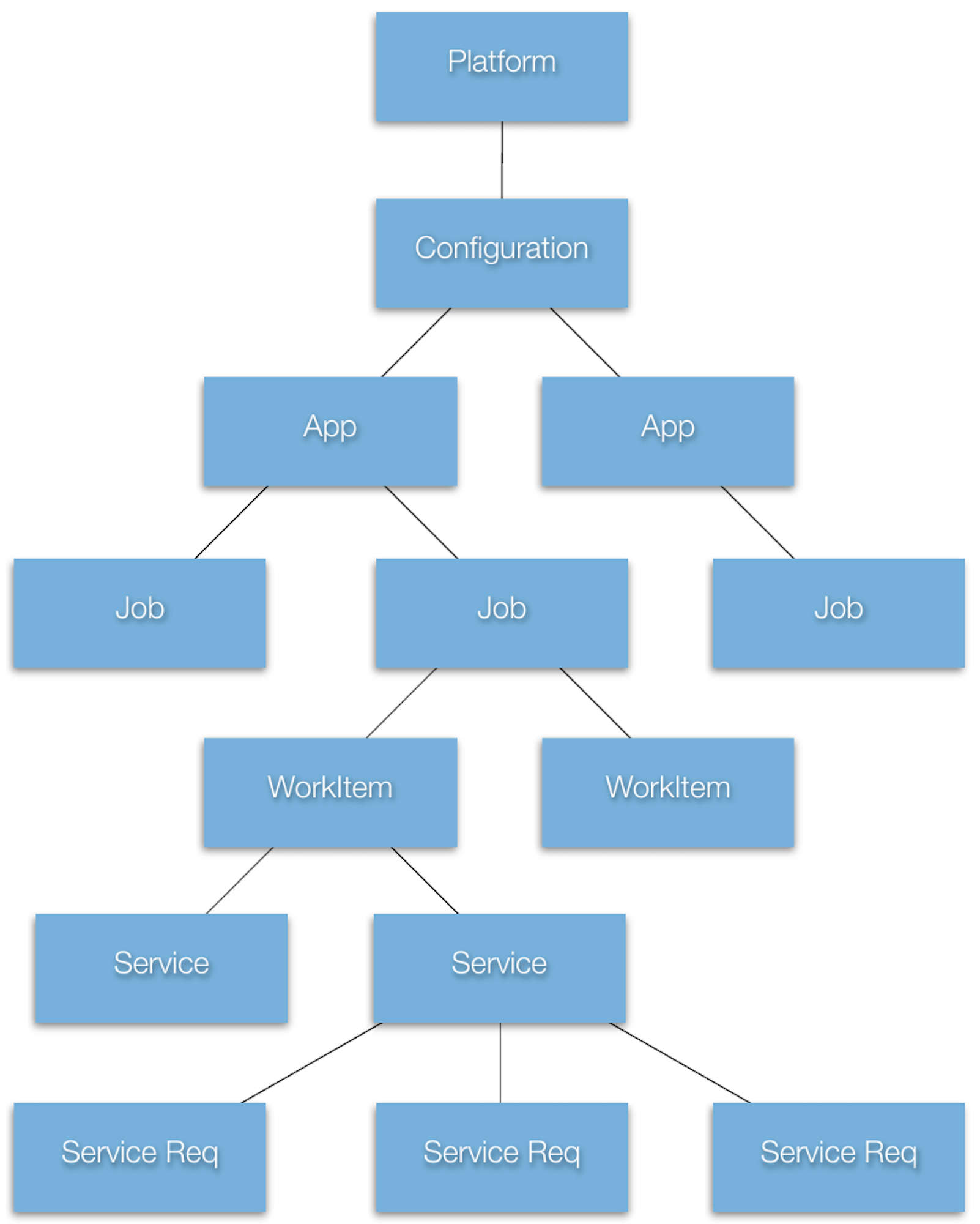
On a specific Platform, there may be a number of Configurations. Within a particular Configuration, there may exist a number of Apps. Each App may run a number of different Jobs, where each Job may consist of one or more WorkItems. Each WorkItem engages one or more Services to which the WorkItem makes a number of Service Requests.
Platform
The Platform is the runtime-specific foundation beneath Cloudworks. It represents the environment in which the application is executing—for example, a browser client, a desktop client, a local server, or a Cloud Run service. Platform implementations provide the common factories and runtime operations used by higher layers: creating jobs and service requests, dispatching work, observing network state, and scheduling platform tasks. Application code normally reaches it through Configuration.getPlatform() rather than binding itself to a particular runtime implementation.
Configuration
A Configuration describes how one Cloudworks application should operate on a Platform. It supplies the service addresses and operating environments that determine whether a particular service is local, containerized, or deployed to Cloud Run. It also carries configuration shared by jobs, such as repository, cloud-service, and service-budget settings. A Platform may support several Configurations, allowing the same application design to run against different local or cloud topologies.
App
An App is the application-level owner of a user-visible Cloudworks workflow. It provides the application lifecycle, credentials and authentication context, progress and status reporting, and the application support needed to coordinate its work. An App may create multiple Jobs over its lifetime—for example, as a user starts independent operations or submits separate documents for processing.
Job
A Job is the shared operational identity for one coherent unit of application work. It owns the configuration snapshot, authenticated registration state, service job tokens, shared service state, and Job Constraints that apply across its work items. Every executable Cloudworks service request belongs to a work item and therefore to a job. This shared ownership is what lets multiple service operations participate in one authenticated workflow while observing the same capacity and policy limits.
WorkItem
A WorkItem is a contextual unit of work within a Job. It has its own context identity and records the services used while producing intermediate or final work products. A Job may have many WorkItems, allowing an application to divide a larger workflow into independently dispatched units while retaining shared job identity, registration, credentials, and constraints. FairCare document sections are an example of work that can be represented by separate work items within one job.
Service
A Service is the client-side fluent interface for one Cloudworks capability, such as Noteboard, OpenAI Transaction, EOC Analysis, or MailNotifier. A service instance is bound to a WorkItem and can be configured with request representation, result routing, sequencing, and reusable request requirements. It may produce one physical request or many through repetition, concurrent work, or retry behavior. The Service Interface section explains this configuration surface in detail.
Service Request
A Service Request is one exact physical attempt to invoke a Service. It carries the concrete endpoint, method, parameters, headers, timeout, source and result-routing information, and the service job token used to authenticate the request. When a configured service produces an attempt, Cloudworks also copies any reusable request requirements into that request's immutable snapshot. The appropriate job or request-specific gate admits the physical request before its HTTP execution begins; its completion or failure then releases the corresponding permit.
Constraints
Constraints coordinate shared capacity without making each service operation aware of every other operation in its job. They are especially important when a job dispatches work concurrently: many services or work items may try to start physical requests at the same time while consuming one limited resource such as active analysis sections, provider requests per minute, or provider tokens per minute. A job declares the capacity that is allowed, and a configured service declares the capacity that each request it produces requires.
The job's admission gate is the asynchronous controller that applies those declarations. It receives each physical request attempt, compares its required capacity with the job's policy and current state, and either admits the request immediately or holds it until capacity becomes available. Cloudworks copies the service declaration into each physical request attempt before the gate makes that decision. When the gate admits an attempt, it issues a permit: the exact provisional capacity reservation associated with that physical request. Completion or error releases the permit and its reservation. The gate does not dedicate a thread to each waiting request and does not sleep while capacity is unavailable. It queues the request and reevaluates it when an admitted request's permit is released, current state changes, or a configured reevaluation time arrives. A platform thread is used only after the gate admits the physical request for execution.
Job constraint policy
   “at most 16 active sections”
             +
Service request requirement
   “each produced request needs 1 section”
             |
             v
Physical request attempt
   immutable requirement snapshot
             |
             v
       Job admission gate
             |
             v
     Physical request execution
Job Constraint Policy
Job constraint policy is durable, shared state owned by an IJob. The planned public JobConstraint value declares a named resource, a policy relation, and a permitted value. withJobConstraints(...) atomically contributes one or more policy declarations to the service's owning job; it must not replace unrelated policy established by another service.
| Relation | Meaning |
|---|---|
AT_MOST | Inclusive upper bound. |
AT_LEAST | Inclusive lower bound. |
EQUAL | Required scalar value. |
Numeric boundaries use AT_MOST or AT_LEAST; numeric, string, and boolean values may use EQUAL. A contradictory policy contribution fails without changing the job. Compatible redundant policy may remain available as provenance. Current usage is runtime state managed by the gate, not ordinary policy configured by an application author.
For example, this policy allows at most sixteen active FairCare analysis sections for the job:
IEOCDocumentAnalysisService
   .of(work)
   .withJobConstraints(
      new JobConstraint(
         "faircare.activeSections",
         AT_MOST,
         16L))
Service Request Requirements
A Service Request Requirement is reusable configuration owned by a service instance. It is not a job-policy constraint. It says how much of a named job resource every physical request later produced by this service will need. The planned requestRequires(key, value) fluent verb declares that demand:
IEOCDocumentAnalysisService
   .of(work)
   .requestRequires("faircare.activeSections", 1L)
   .analyze(...);
requestRequires(...) applies to the configured service, not only to the next request. Sequence iterations, concurrent work, and retries inherit it. When the service produces a physical attempt, Cloudworks copies the requirement into that attempt's immutable snapshot. A service with no requirements produces requests that the default gate admits immediately. Names such as faircare.activeSections and openai.inputTokensPerMinute are application-defined; the shared key is what links a service requirement to the corresponding job policy.
Together, the normal public declaration reads as one configured service operation:
IEOCDocumentAnalysisService
   .of(work)
   .withJobConstraints(
      new JobConstraint(
         "faircare.activeSections",
         AT_MOST,
         16L))
   .requestRequires("faircare.activeSections", 1L)
   .analyze(...);
Current State and Internal Request Snapshots
The gate maintains the transient information required to apply job policy to a particular physical attempt. This state is represented internally by IJob.IConstraints<V>, a JSON-serializable map of named, ordered constraint lists. It is deliberately different from the planned public declarations above:
| Internal relation | Runtime meaning |
|---|---|
CURRENT_VALUE | The gate's current observed value for a named job resource, such as the number of active sections. |
REQUEST_VALUE | The immutable value copied from one service's request-requirement template onto one physical request attempt. |
For a numeric active-section resource, admission temporarily adds the request's REQUEST_VALUE to the job's CURRENT_VALUE. Completion or error reverses that exact provisional reservation. An application normally does not configure either relation directly: policy is declared with withJobConstraints(...), and demand with requestRequires(...).
Request Admission and Permits
The default Job.Gate provides FIFO, asynchronous admission. It owns no worker thread and does not sleep. A blocked request remains queued until a permit is released, current state is adjusted, the gate is explicitly reevaluated, or an application-supplied reevaluation timer becomes due.
For numeric requirements, the lifecycle of each physical attempt follows this sequence:
- A configured service produces a physical request and copies its requirement template into the request's immutable snapshot.
- The gate considers the request at the head of the FIFO queue.
- It combines the request's
REQUEST_VALUEwith the matchingCURRENT_VALUEand evaluates the resulting value against all policy predicates. - If the request is allowed, the gate makes a provisional numeric reservation and emits exactly one
IJob.IGate.IPermit. - Cloudworks starts the physical service request. The HTTP request timeout begins here, after any gate wait has completed.
- On completion or error, the gate releases that exact reservation, invokes the corresponding lifecycle callback, and reevaluates waiting requests.
One permit therefore corresponds to one physical request attempt. A retry is a new attempt and must acquire a new permit. This relationship prevents a logical operation with multiple provider attempts from consuming only one unit of gated capacity.
The permit exposes its request, admitted requirements, exact numeric reservations, owning job, and admission time. The gate also exposes current and high-water counts for active and waiting permits, which are useful for operational diagnostics and concurrency tests.
Gate Lifecycle and Measurement
The default gate callbacks are no-ops. Applications may add behavior only where their measurements require it:
| Hook | Application use |
|---|---|
onCompletion(...) | Replace an estimate with measured successful-request usage or update other current state. |
onError(...) | Record failed-attempt usage or failure-related current state. |
onReevaluate(...) | Apply signed, time-based changes to CURRENT_VALUE entries and return the delay before another useful reevaluation. |
adjustCurrentValue(...) | Apply an immediate signed numeric adjustment and reevaluate queued requests. |
The gate releases its provisional reservation before calling onCompletion(...) or onError(...). A provider integration can therefore reserve an estimated token count at admission, release that estimate when the response arrives, and then record the measured token count. If a hook is not supplied, reservation, release, and FIFO admission still work without application callbacks.
Request-Specific Provider Gates
A request produced by ordinary service configuration uses the gate owned by its IJob. The low-level IServiceRequest.setGate(...) remains available for advanced infrastructure code to assign a request-specific gate. This is useful when a nested provider request must obey a boundary shared more broadly than the enclosing application job. Cloudworks resolves the gate in this order:
- Use the request-specific gate when one is present.
- Otherwise, use the owning job's gate.
The two gates are applied to different physical service requests rather than being merged into one constraint map. For example, FairCare preprocessing uses the following composition:
FairCare work item
   -> FairCare job gate: active analysis sections
   -> EOC Analysis service request
   -> OpenAI request-specific gate: provider request and token rates
   -> OpenAI provider request
The first gate bounds work admitted into FairCare analysis. The second protects the shared OpenAI account at the provider boundary. This composition preserves independent policy ownership and ensures each gate observes the physical attempt it is intended to control.
Durable Policy and Transient State
Constraint maps are JSON-serializable through JSONAware, and IJob.IConstraints.fromJSONString(...) restores them. This allows job policy and current values to travel with or be restored with a job. The ordered lists also make diagnostics and serialized policy deterministic. Service requirement templates and their physical-request snapshots are runtime execution configuration; the durable shared state is the job policy and its current values.
Gate functions and callbacks are runtime application behavior and are not serialized. After a job is restored, the application must reinstall any custom onCompletion(...), onError(...), or onReevaluate(...) behavior it requires. The default gate remains usable without those hooks.
Job Registration
Before work begins, the client registers a job and the services it will use. The platform establishes the job context, and subsequent requests carry the appropriate service-specific registration information.
Authentication and application security
Use the platform's supported sign-in and registration flow. Keep user passwords, service credentials and signing keys out of browser bundles, documentation and publicly served files. Authentication does not replace authorization: services must enforce the permissions appropriate to the requested operation.
Transport protection and access controls depend on the deployed configuration. This overview is not a security specification or a guarantee of end-to-end encryption. Contact Giavaneers for the current integration and security requirements.
Service Interface
The Cloudworks service interface covers more than the concrete service object. Four cooperating interfaces define one fluent interface through which an application constructs, admits, and executes a physical service request:
| Interface | Responsibility |
|---|---|
IService | Configures a service, including reusable admission requirements, and submits its requests. |
IServiceRequest | Describes one physical request attempt, including a snapshot of the capacity it requires. |
IJob | Owns the shared application policy and current state governing its work items. |
IJob.IGate | Admits a request only when its requirements are allowed by the job policy. |
Service configuration and execution produce the logical work and its physical request attempts. Job Constraints, described above, decide when each produced physical attempt may begin.
Service Configuration and Execution
Most concrete Cloudworks service APIs expose fluent verbs defined by IService. In practice you usually obtain a concrete service such as IControl, INoteboard, or IAITransactionService, configure it fluently, and then subscribe to the resulting observable.
The examples below assume the following local variables already exist:
IWorkItem        work    = ...;
IJob             job     = work.getJob();
IService         service = ...;
IService         cache   = ...;
IData            source  = ...;
IServiceRequest  request = ...;
The tables intentionally focus on simple usage. Methods whose main purpose is framework integration are marked as advanced.
Repetition and sequencing are part of this layer. They decide whether further logical work exists, which request is produced next, and how its result participates in the service sequence. They do not decide whether a produced physical request has shared capacity to start; that is the role of Job Constraints.
Factory and Lifecycle Verbs
| Verb | Purpose | Simple example |
|---|---|---|
of(...) | Obtain or resolve a concrete service instance for a work item. | OpenAITransactionService.of(work) |
setImplementation(...) | Register a custom implementation factory for a service interface. Advanced. | IService.setImplementation("MyService", MyService::new); |
setWork(...) | Rebind a service instance to a work item. Advanced. | service.setWork(work); |
initialize() | Reset the service so it is ready for a fresh request sequence. | service.initialize(); |
Request Configuration Verbs
| Verb | Purpose | Simple example |
|---|---|---|
addHeader(key, value) | Add one request header to subsequent service calls. | service.addHeader("Authorization", "Bearer " + token); |
addHeaders(headers) | Add several request headers at once. | service.addHeaders(commonHeaders); |
networkOfflineRetryTime(retryTime) | Retry transient offline failures for the specified number of milliseconds. | service.networkOfflineRetryTime(30000); |
dataByValue() | Ask for result data to be returned inline. | service.dataByValue(); |
dataByReference() | Ask for result data to be returned by repository reference. | service.dataByReference(); |
setResultFilename(name) | Suggest the filename to use for the primary result. | service.setResultFilename("summary.txt"); |
consumer(consumer) | Supply a byte consumer for streamed or downloaded bytes. | service.consumer(bytes -> savePreview(bytes)); |
supplier(supplier) | Supply bytes that the service request should send or use. | service.supplier(() -> readPayloadBytes()); |
Proposed Constraints Verbs
The following fluent additions specify the intended public Service Interface. They are documented before implementation so the public model, rather than a transient low-level request object, drives the design. Each concrete service interface will redeclare them with its own return type, preserving chains such as .requestRequires(...).analyze(...).
| Verb | Purpose | Simple example |
|---|---|---|
withJobConstraints(constraints...) | Atomically merge named policy constraints into the owning job before its gate becomes active. | .withJobConstraints(new JobConstraint("faircare.activeSections", AT_MOST, 16L)) |
requestRequires(key, value) | Configure capacity required by every physical request attempt later produced by this service instance. | .requestRequires("faircare.activeSections", 1L) |
withJobConstraints(...) contributes policy to the service's existing job; it does not replace unrelated job policy established by another service. A conflicting contribution fails without changing the job. requestRequires(...) is service configuration. It is inherited by later sequence iterations, concurrent work, and retries, then copied as an immutable requirement snapshot onto each physical IServiceRequest. The existing low-level IServiceRequest.requires(...) remains the per-attempt mechanism used beneath this fluent surface.
Result Routing Verbs
| Verb | Purpose | Simple example |
|---|---|---|
addResultLocal() | Keep the result only in the local client cache. | service.addResultLocal(); |
addResultTarget(target) | Forward each result to another service. | service.addResultTarget(cache); |
setResultTargets(targets) | Replace the full result target list. Advanced. | service.setResultTargets(Arrays.asList(cache)); |
Repetition and Sequencing Verbs
| Verb | Purpose | Simple example |
|---|---|---|
continueIf(evaluator) | Keep issuing requests while the evaluator says there is more work. | service.continueIf(svc -> hasMorePages()); |
sequentially() | Use sequential repeated dispatch, which is the normal repeated-request mode. | service.sequentially(); |
sequentially(interval) | Repeat sequentially with a pause between iterations. | service.sequentially(1000); |
concurrently(supplier) | Reserve concurrent repeated dispatch. Not yet supported. | service.concurrently(jobSource); |
setRepeatSequenceInterval(ms) | Set the delay between repeated iterations. | service.setRepeatSequenceInterval(500); |
onEachResult(handler) | Run code after each iteration result. | service.onEachResult((svc, data) -> log(data)); |
onSequenceComplete(handler) | Run code once after the full sequence completes. | service.onSequenceComplete(svc -> done()); |
Data Movement Verbs
| Verb | Purpose | Simple example |
|---|---|---|
pullSource(data) | Declare source data that should be pulled into the local repository first. | service.pullSource(source); |
putData(path, contents) | Upload text contents to the remote service workspace. | service.putData("scripts/run.py", scriptText); |
putDataSinglePart(name, bytes, numParts, partNum) | Upload one binary part explicitly. | service.putDataSinglePart("video.bin", chunk, 4, 1); |
getURLAsBytes(url) | Read a URL directly as bytes. | service.getURLAsBytes(mediaURL).subscribe(bytes -> play(bytes)); |
Execution and Status Verbs
| Verb | Purpose | Simple example |
|---|---|---|
makeServiceRequest(request) | Submit a low-level service request directly. Advanced. | service.makeServiceRequest(request).subscribe(data -> show(data)); |
getStatus() | Ask the service for its current status. | service.getStatus().subscribe(status -> show(status)); |
getStatusSEE() | Ask the service for status using SSE transport. | service.getStatusSEE().subscribe(status -> show(status)); |
State Inspection Verbs
These methods read back the configuration or runtime state currently associated with the service. They are often useful inside debugging, callbacks, or framework code.
| Verb | Purpose | Simple example |
|---|---|---|
getConsumer() | Get the currently assigned byte consumer. | Consumer<byte[]> handler = service.getConsumer(); |
getContinueIf() | Get the current repeat evaluator. | Function<IService,Boolean> f = service.getContinueIf(); |
getDispatchSupplierr() | Get the current dispatch supplier placeholder. | Supplier<?> s = service.getDispatchSupplierr(); |
getHeaders() | Get all request headers currently attached to the service. | Map<String,Set<String>> headers = service.getHeaders(); |
getNetworkOfflineRetryTime() | Get the current offline retry time limit. | long retryMs = service.getNetworkOfflineRetryTime(); |
getOnEachResult() | Get the current per-result handler. | BiConsumer<IService,IDataList> h = service.getOnEachResult(); |
getOnSequenceComplete() | Get the current sequence completion handler. | Consumer<IService> h = service.getOnSequenceComplete(); |
getRepeatSequenceInterval() | Get the current repeat interval. | int intervalMs = service.getRepeatSequenceInterval(); |
getResultTargets() | Get the current result forwarding targets. | List<IService> targets = service.getResultTargets(); |
getServiceName() | Get the logical Cloudworks service name. | String name = service.getServiceName(); |
getServiceState(name) | Read one arbitrary service state value by name. | Object value = service.getServiceState("myFlag"); |
getServiceStats() | Get accumulated service statistics. | IServiceStats stats = service.getServiceStats(); |
getSourceData() | Get the current source DataList. | DataList data = service.getSourceData(); |
getSSEEnabled() | Test whether SSE mode is enabled. | boolean bSSE = service.getSSEEnabled(); |
getSupplier() | Get the current byte supplier. | Supplier<byte[]> s = service.getSupplier(); |
getSvcJobToken() | Get the registered service job token. | String token = service.getSvcJobToken(); |
getValueNames() | Get the names of service values currently tracked. | List<String> names = service.getValueNames(); |
getWork() | Get the work item bound to the service. | IWorkItem currentWork = service.getWork(); |
Internal State Mutation Verbs
These are valid IService verbs, but they are primarily infrastructure hooks rather than common application-level fluent calls.
| Verb | Purpose | Simple example |
|---|---|---|
setServiceState(name, value) | Store an arbitrary state value on the service. | service.setServiceState("phase", "ready"); |
setSvcJobToken(token) | Assign the service job token received during registration. Advanced. | service.setSvcJobToken(token); |
Illustrative Example: aiConversationOpenEnded()
The method aiConversationOpenEnded() is a good example of how a concrete service uses the core IService verbs to create a compact repeated interaction. The test builds a calculator-style conversation, lets the service sequence several turns, then starts additional sessions that resume from the saved conversation state.
Shown below is the complete method. It is a useful example because it is not just a toy snippet: it is a small but functional application of a service that chooses prompts, handles results, repeats turns, and resumes later sessions with very little code.
public void aiConversationOpenEnded()
{
   String  input          = getArgsMap().get("input");
   String  output         = getArgsMap().get("output");
   boolean bSpeech        = input.equalsIgnoreCase("Speech");
   int     sessions       = getArgsMap().getInt("numSessions");
   long    startTime      = System.currentTimeMillis();
   String  conversationId = "aiConversationOpenEnded." + startTime;

   AtomicInteger             lastLoggedIdx      = new AtomicInteger(-1);
   AtomicInteger             numSessions        = new AtomicInteger(sessions);
   AtomicReference<Runnable> launchConversation = new AtomicReference<>();

   String instructions =
      "Act as a precise scientific calculator with a persistent running "
    + "result. Always respond in English. For calculation turns, reply with "
    + "a brief description of the operation you just performed along with "
    + "the current result unless directed otherwise.";

   String[] textPrompts =
   {
      "Choose any number to start with and tell me what it is.",
      "Add 7.",
      "Multiply by 3.",
      "Subtract 5.",
      "We are done. What's the final value?.",
      "Continue from where you left off: I'll give you the next operation."
   };

   String[] speechPrompts =
   {
      "media/ChooseAnyNumber.wav",
      "media/Add7.wav",
      "media/MultiplyBy3.wav",
      "media/Subtract5.wav",
      "media/Done.wav",
      "media/Resume.wav"
   };
                                       // generate the next prompt ---------- //
   Function<IAIConversation, String> nextPrompt =
      service ->
      {
         int      idx     = service.getSequenceState().index;
         String[] prompts = bSpeech ? speechPrompts : textPrompts;
         String   prompt  = service.isResumed() && idx == 0
            ? prompts[prompts.length - 1] : prompts[idx];

         if (lastLoggedIdx.get() != idx)
         {
            lastLoggedIdx.set(idx);
            writeString("User:      " + prompt);
         }
         return prompt;
   };
                                       // handle the response --------------- //
   BiConsumer<IService, IDataList> handleResponse =
      (service, datalist) ->
      {
         String contents = datalist.getContents();
         if (contents != null && contents.length() > 0)
         {
            writeString("Assistant: " + contents);
         }
         else
         {
            done("ERROR: empty response");
         }
      };
                                       // continue if ----------------------- //
   Function<IService,Boolean> thereIsMoreToDo =
      service ->
         ((IAIConversation)service).getSequenceState().index
            < textPrompts.length - 1;
                                       // done conversing for now ----------- //
   Consumer<IService> doneForNow = service ->
   {
      if (numSessions.decrementAndGet() == 0)
      {
         done("Success!\n");
      }
      else
      {
                                       // resume the conversation             //
         launchConversation.get().run();
      }
   };

   writeString("Begin calculator conversation test.");

   launchConversation.set(() ->
   {
                                       // all other than the first are resumed//
      IAIConversation
         .of(newServiceWorkItem())
         .conversationId(conversationId)
         .instructions(instructions)
         .continueIf(thereIsMoreToDo)
         .onEachResult(handleResponse)
         .onSequenceComplete(doneForNow)
         .sendPrompt(nextPrompt);
   });
                                       // clear any prior resumable state     //
   IAIConversation.clear(conversationId);
                                       // start the conversation              //
   launchConversation.get().run();
}
Here is what each part is doing:
| Call | Role in the example |
|---|---|
IAIConversation.of(newServiceWorkItem()) | Creates the concrete service instance for a fresh work item. This is the normal entry point into the fluent API. |
.conversationId(conversationId) | Binds the conversation to a stable user-facing id, so later sessions can resume the same saved conversation state. |
.instructions(instructions) | Gives the assistant a persistent behavioral contract, in this case acting like a concise calculator. |
.continueIf(thereIsMoreToDo) | Tells the service to keep taking turns while the current sequence index is still inside the prompt list. |
.onEachResult(handleResponse) | Receives each assistant reply as it arrives and logs it to the test output area. |
.onSequenceComplete(doneForNow) | Runs once when the current session has finished its sequence of turns. The test uses it either to launch the next session or to declare success. |
.sendPrompt(nextPrompt) | Starts the interaction and asks the service for the next prompt text at each step. This one call kicks off the whole repeated turn sequence. |
The supporting callbacks make the sequence easy to follow:
| Callback | How it works |
|---|---|
nextPrompt | Looks at service.getSequenceState().index and chooses the next prompt. If the session is resuming and the index is back at zero, it sends the special resume prompt instead. |
handleResponse | Reads the returned IDataList, prints the assistant text, and fails the test if the response is empty. |
thereIsMoreToDo | Stops the current session after the last normal calculator prompt has been answered. |
doneForNow | Counts down the remaining sessions. If more sessions remain, it launches the next one; otherwise it prints Success!. |
Two especially useful details are easy to miss when just skimming the method:
| Detail | Why it matters |
|---|---|
sendPrompt(nextPrompt) | A single call starts the first turn and also drives every later turn in the sequence. That is a large part of why the example stays compact. |
IAIConversation.clear(conversationId) | It guarantees the first session starts clean, while later sessions can still resume because they reuse the same conversationId. |
The result is a small but realistic example showing how IService sequencing verbs can express a useful multi-turn workflow without manually wiring each turn.
Built-In Services
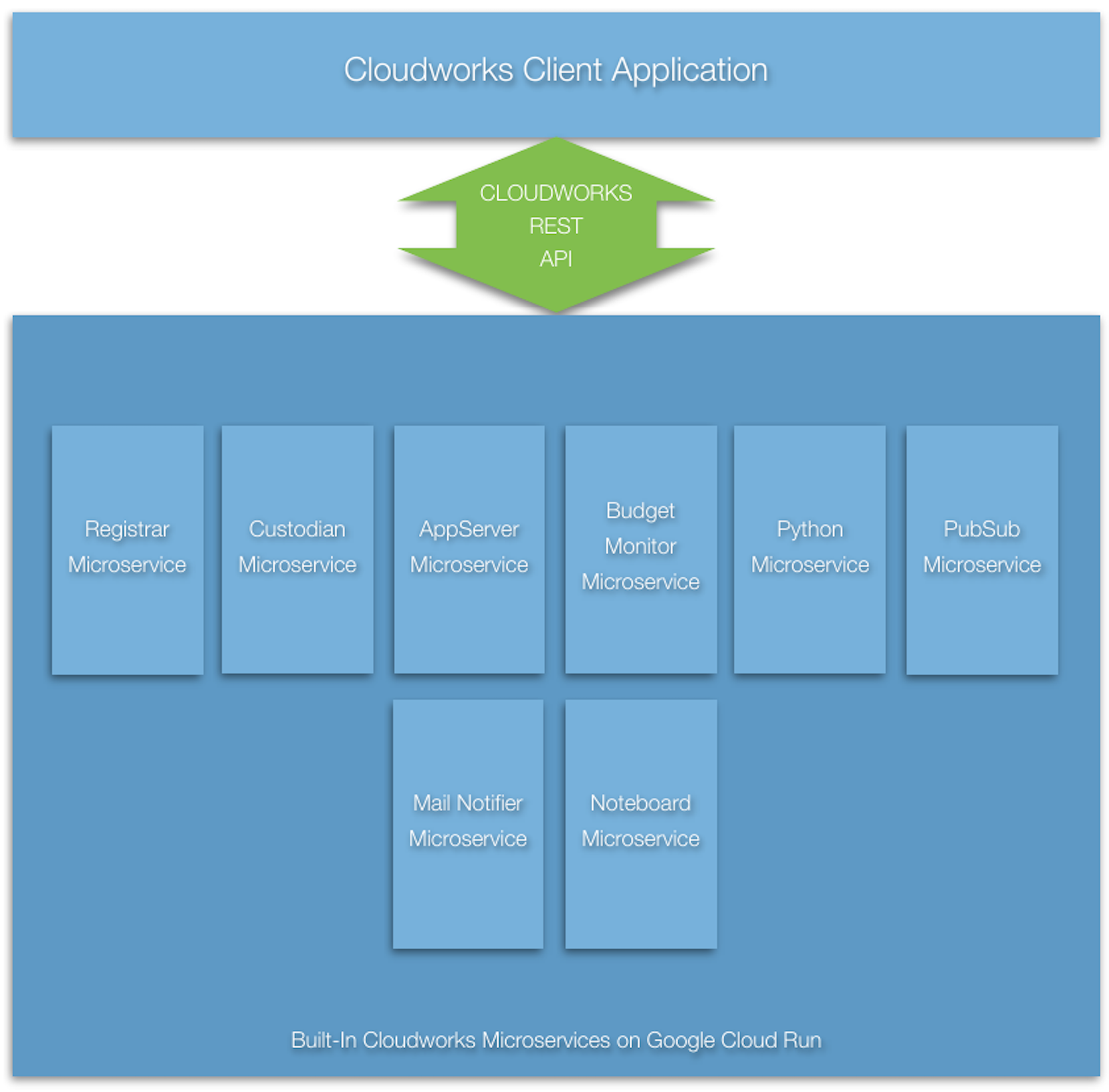
Cloudworks includes a number of services that are built-in as part of the platform. These services provide standard capabilities used by Cloudworks applications and by other microservices, and they may be deployed in any of the supported operating configurations. Some built-in services primarily support application orchestration, job management, context handling, storage, communication, or integration with external AI and utility providers.
AppServer
The AppServer service exists to launch and host application code within the Cloudworks environment. It provides the bridge between the Cloudworks orchestration model and executable application logic, allowing a job to transition from service-level coordination into application- level behavior. In practice it is used when a Cloudworks workflow needs to start or route work into a Java application entrypoint rather than only invoking narrower worker microservices.
Control
The Control service is the orchestration hub of the Cloudworks platform. It exists to register jobs with participating services, coordinate trusted service-to-service execution, and signal job progress or completion across a multi-service workflow. When several built-in or custom services must cooperate on the same job, Control is typically the service that establishes that shared operational context.
CORSGet
The CORSGet service exists to retrieve remote content from locations that may not be directly accessible from browser-based application code because of cross-origin restrictions. It acts as a small platform utility that lets Cloudworks applications and services fetch external resources through a controlled server-side path instead of relying on unrestricted browser access.
Calculator
The Calculator service provides bounded, server-side numerical calculation through the ordinary Cloudworks service model. Its versioned restricted formula language is evaluated by the server; the client supplies only the declared calculation inputs and receives structured numeric results. The service is intended for workloads whose individual calculations are independent, deterministic, and naturally distributable across Cloudworks service requests.
Calculator has two complementary operations:
evaluate(IEvaluationRequest)evaluates one scalar formula independently over corresponding elements of named numeric vectors. All supplied vectors have the same length, and the formula is parsed once for the request.iterate(IIterationRequest)performs a bounded simultaneous-state calculation over a compact two-dimensional grid. It evaluates all next-state formulas from the preceding state, commits the state together, tests the continuation formula, and never exceeds the declared maximum iteration count.
For a finite collection of independent grid calculations, such as image tiles, an application can provide iterationRequests(...) and apply the ordinary IService sequencing verbs. In particular, concurrently(...) controls the client-side dispatch of fresh immutable Calculator requests while onEachResult(...) receives results in completion order. This lets an application progressively assemble a result without requiring the service itself to know the presentation or aggregation policy.
Parallel-Render Experiment
The Calculator service was used to make the effects of Cloudworks concurrent dispatch and Cloud Run instance configuration visible. The Mandelbrot.render() application divides a 1024 x 1024 Mandelbrot image into 256 independent 64 x 64 tiles. It keeps up to 64 Calculator requests in flight, assembles each returned tile immediately, and reports both wall-clock elapsed time and the sum of individual Calculator request durations.
Each configuration below was run three times: one cold start followed by two warm starts. The warm-run averages are the useful latency comparison because a single cold start also includes container provisioning and startup variability.
| Cloud Run configuration | Warm elapsed average | Warm summed request duration average | Result |
|---|---|---|---|
concurrency=1, cpu=1, memory=1Gi | 11.68 seconds | 348.42 seconds | Baseline. |
concurrency=2, cpu=2, memory=1Gi | 7.80 seconds | 285.88 seconds | 33% lower warm elapsed time than the baseline. |
concurrency=4, cpu=4, memory=2Gi | 7.76 seconds | 287.30 seconds | No material warm-latency improvement over 2 / 2. |
The summed request duration is a measure of overlapping request lifetimes, not a direct measure of CPU cores or Cloud Run cost. The Cloud Run container/billable_instance_time metric is the proper source for cost analysis. For the corresponding three-run 2 / 2 and 1 / 1 samples, it reported 782.39 and 1,341.41 billable instance-seconds respectively. Thus 2 / 2 used 41.7% less billable instance time. Because its instances have two vCPUs, however, it consumed 1,564.79 vCPU-seconds compared with 1,341.41 vCPU-seconds for 1 / 1; it traded approximately 16.7% more allocated CPU capacity for substantially lower warm latency. Memory time was lower and request charges were the same because each sample issued the same 768 tile requests.
The current Calculator deployment therefore uses concurrency=2, cpu=2, and memory=1Gi. It also uses max=100 and max-instances=100, which exactly fits the current regional 200-vCPU quota. This is a workload-specific operating decision, not a global Cloud Run rule. A service should use concurrency no greater than the useful parallelism its request implementation can sustain, and its CPU allocation should match that concurrency for genuinely CPU-bound work. Larger instances should be selected only when measured latency, billable instance time, and allocated CPU capacity justify them.
MailNotifier
The MailNotifier service centralizes email notification within the platform. It exists so that applications and other services can request mail delivery through a standard Cloudworks service contract instead of each implementing its own SMTP or mail-provider integration logic. In many workflows it is used near the end of processing to notify an administrator, operator, or end user that a result is available or an exception condition has been detected.
Noteboard
The Noteboard service provides a lightweight subject/content note store for Cloudworks jobs and applications. It exists to support simple persistence, shared state, examples, tests, and small content-exchange workflows without requiring a heavier database-oriented service. In practice it is often used as a convenient shared content surface for posting and retrieving notes associated with a job or application context.
OpenAIRealtime
The OpenAIRealtime service exists to expose OpenAI realtime interaction capabilities through the Cloudworks service model. It is intended for conversational and multimodal scenarios where a session may involve streamed text, live audio, or back-and-forth interaction rather than a single independent transaction. Within the platform it provides the low-latency AI interaction path that complements the more discrete transaction-oriented OpenAI services.
OpenAITransaction
The OpenAITransaction service exists to support discrete OpenAI request/response operations as ordinary Cloudworks service invocations. It is used when an application or workflow needs a bounded AI transaction such as a prompt, completion, transformation, extraction, or similar single-unit operation that fits naturally into the standard job/request/result pattern. It provides an AI integration surface while keeping the rest of the workflow within the usual Cloudworks orchestration and authentication model.
Python
The Python service exists so that Cloudworks jobs can invoke Python-based logic without making the whole platform Python-native. It provides a structured execution path for installed scripts, generated code blocks, arguments, and returned results while preserving the Cloudworks job, repository, and service-request model. It is typically used when part of a workflow is best implemented with Python libraries or scripting but still needs to participate in a broader Cloudworks orchestration.
QdrantMaintenance
The QdrantMaintenance service exists to support platform maintenance and health-oriented operations for Qdrant-backed vector data used by Cloudworks applications such as FairCare. It is not a general-purpose end-user workflow service; instead it provides an operational surface for checking, maintaining, or administratively supporting vector-store resources that other AI-driven services depend upon. It also supports the built-in scheduler activity that periodically exercises the Qdrant deployment so the database remains active and ready for use rather than drifting into an idle state between application requests.
Operating Configurations
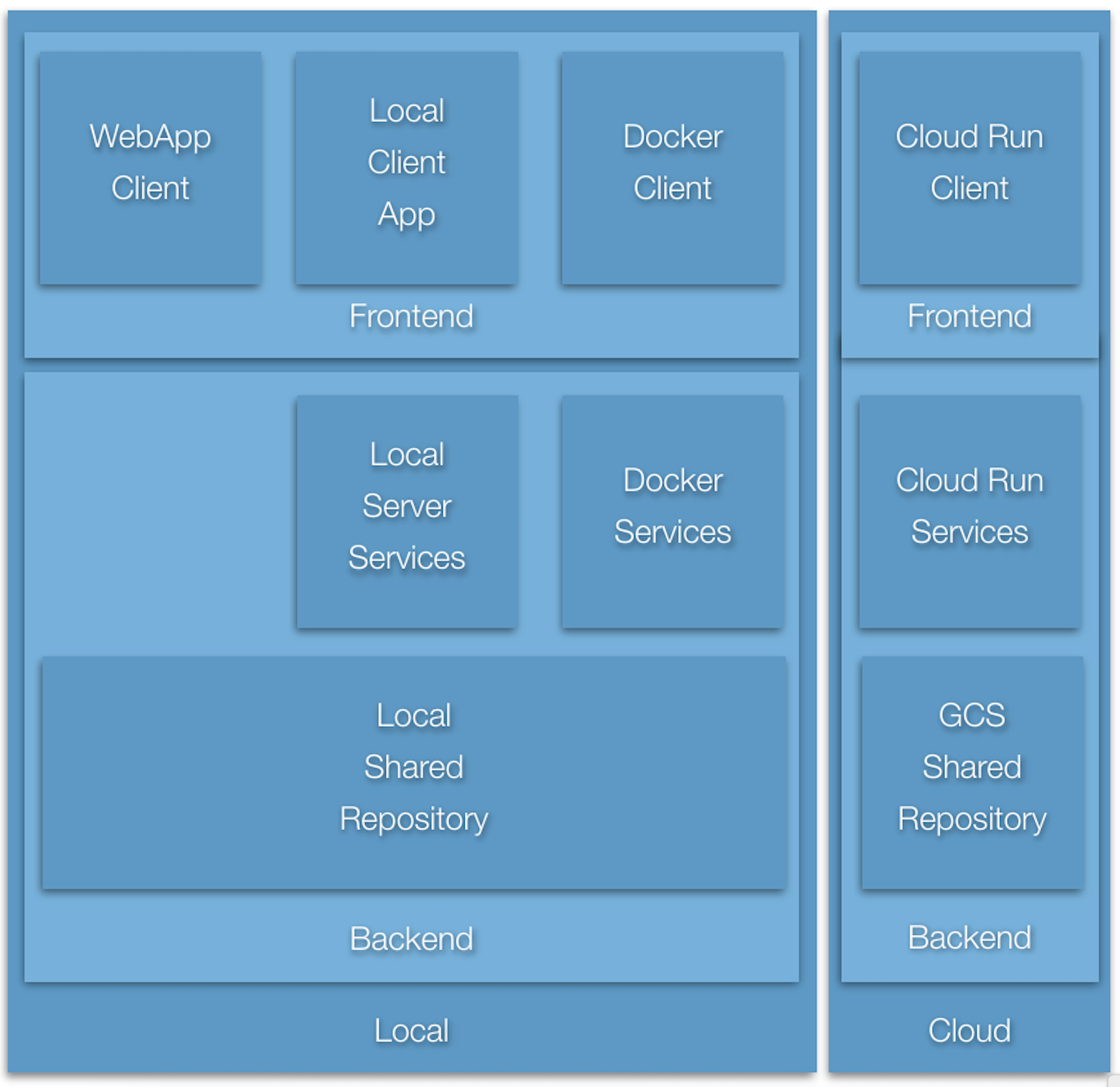
A Cloudworks application may be configured to operate in a variety of configurations. In general, backend services may operate in a local server application, in a local Docker container, or in a CloudRun container. The application frontend may operate either bound with the local browser based user interface, as a local standalone application, in a local Docker container, or in a CloudRun container. Because of addressing issues, not all permutations are possible. The following sections detail the supported set.
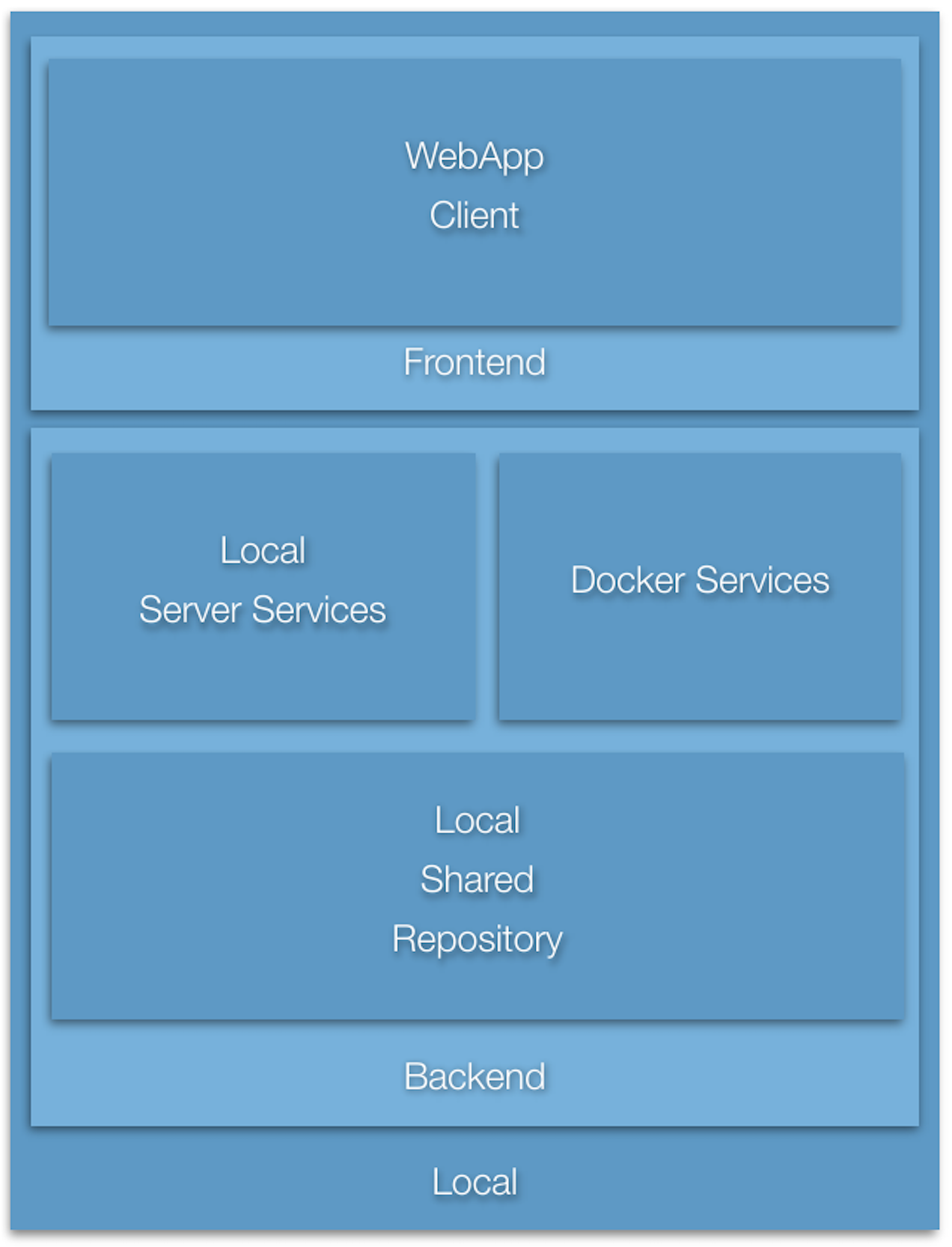
All Local Server Configuration
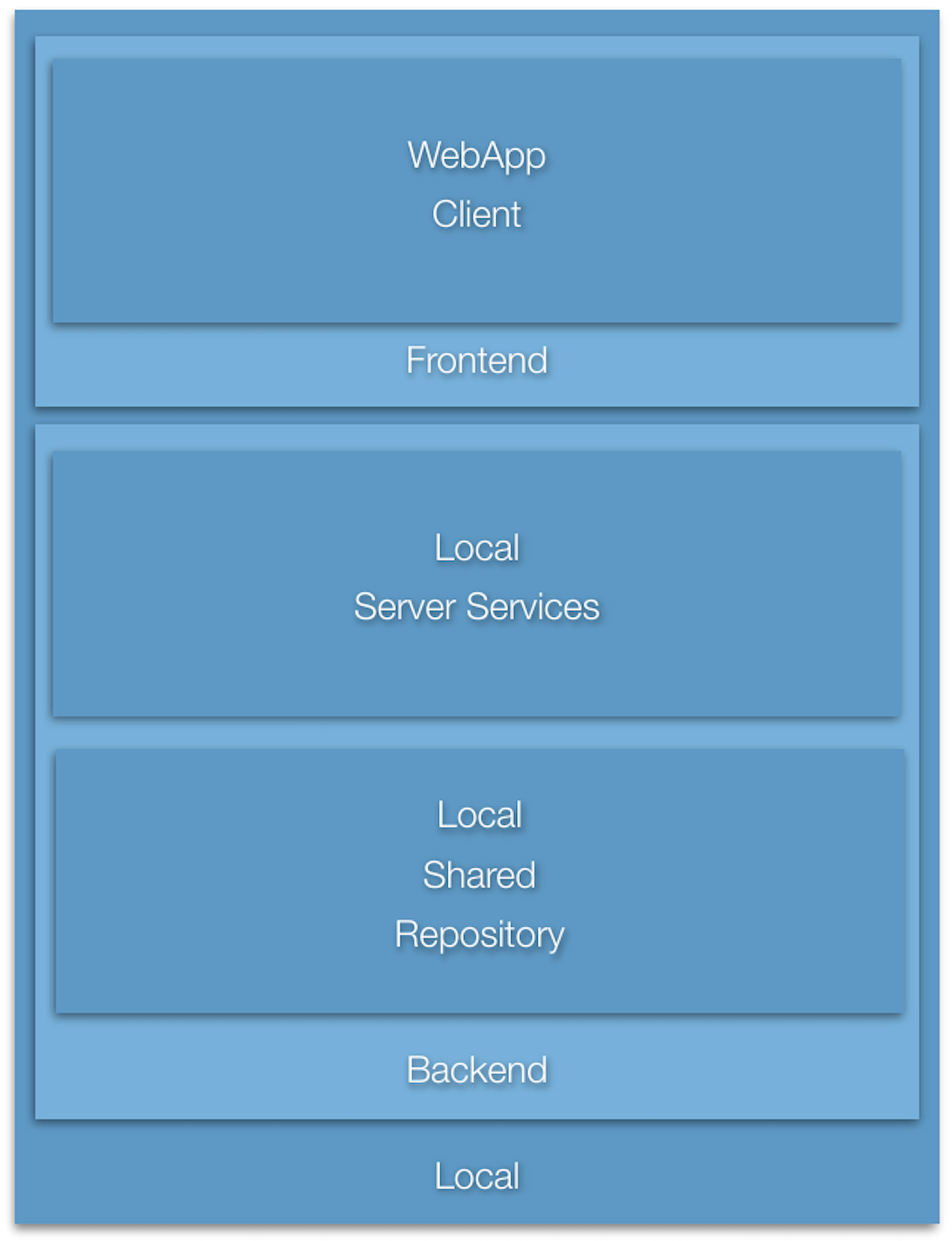
All frontend configurations are supported: bound with the local browser based user interface, as a local standalone application, running in a local Docker container, or running in a CloudRun container. All backend configurations are supported with the first three, but because of addressing issues, if running in a CloudRun container, the backend services must be in the pure CloudRun configuration.
Mixed Local Docker Configuration
All frontend configurations are supported: bound with the local browser based user interface, as a local standalone application, running in a local Docker container, or running in a CloudRun container. All backend configurations are supported with the first three, but because of addressing issues, if running in a CloudRun container, the backend services must be in the pure CloudRun configuration.
Mixed Local Docker Configuration
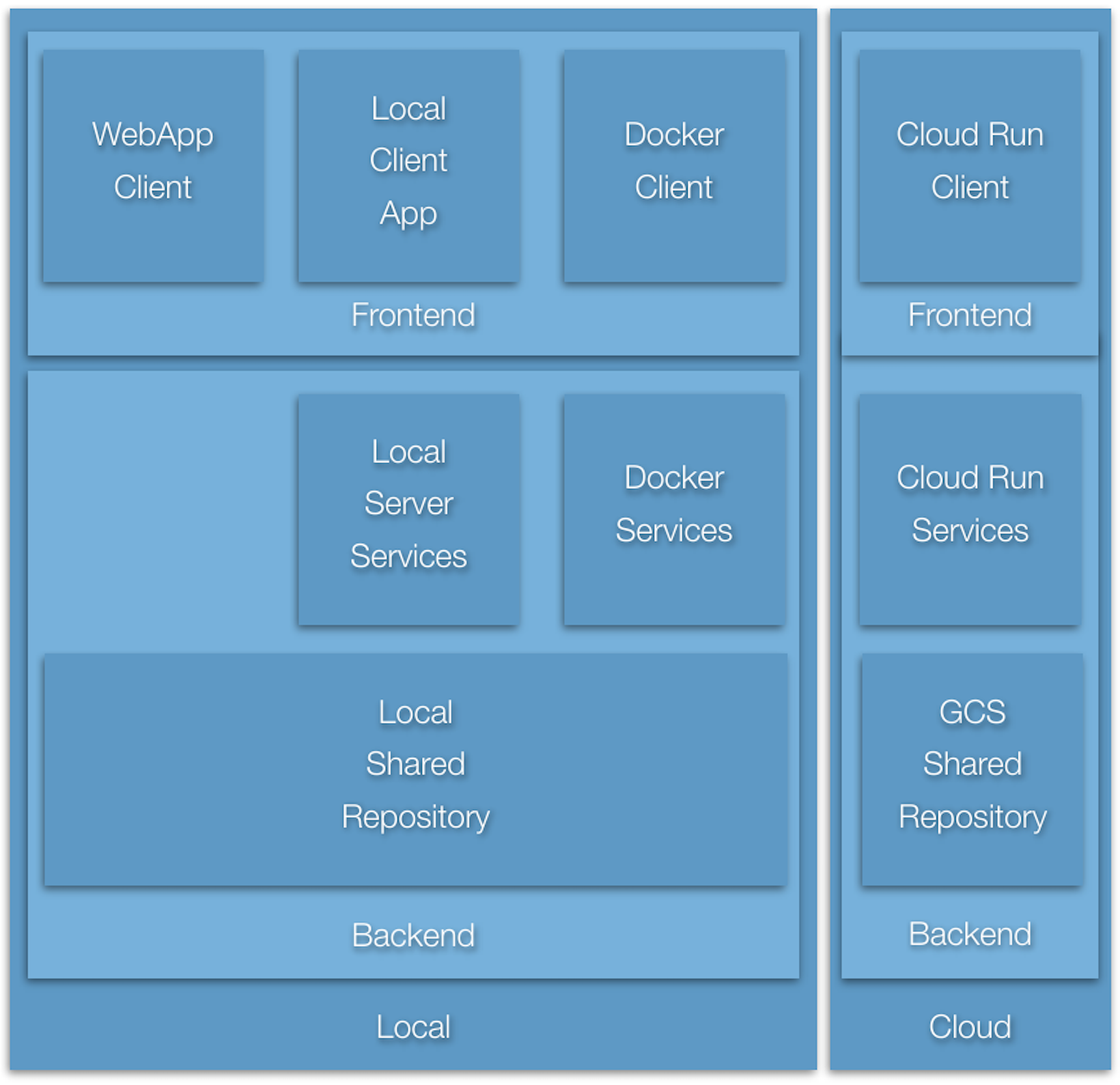
All frontend configurations are supported: bound with the local browser based user interface, as a local standalone application, running in a local Docker container, or running in a CloudRun container. All backend configurations are supported with the first three, but because of addressing issues, if running in a CloudRun container, the backend services must be in the pure CloudRun configuration.
Mixed Cloud Run Configuration
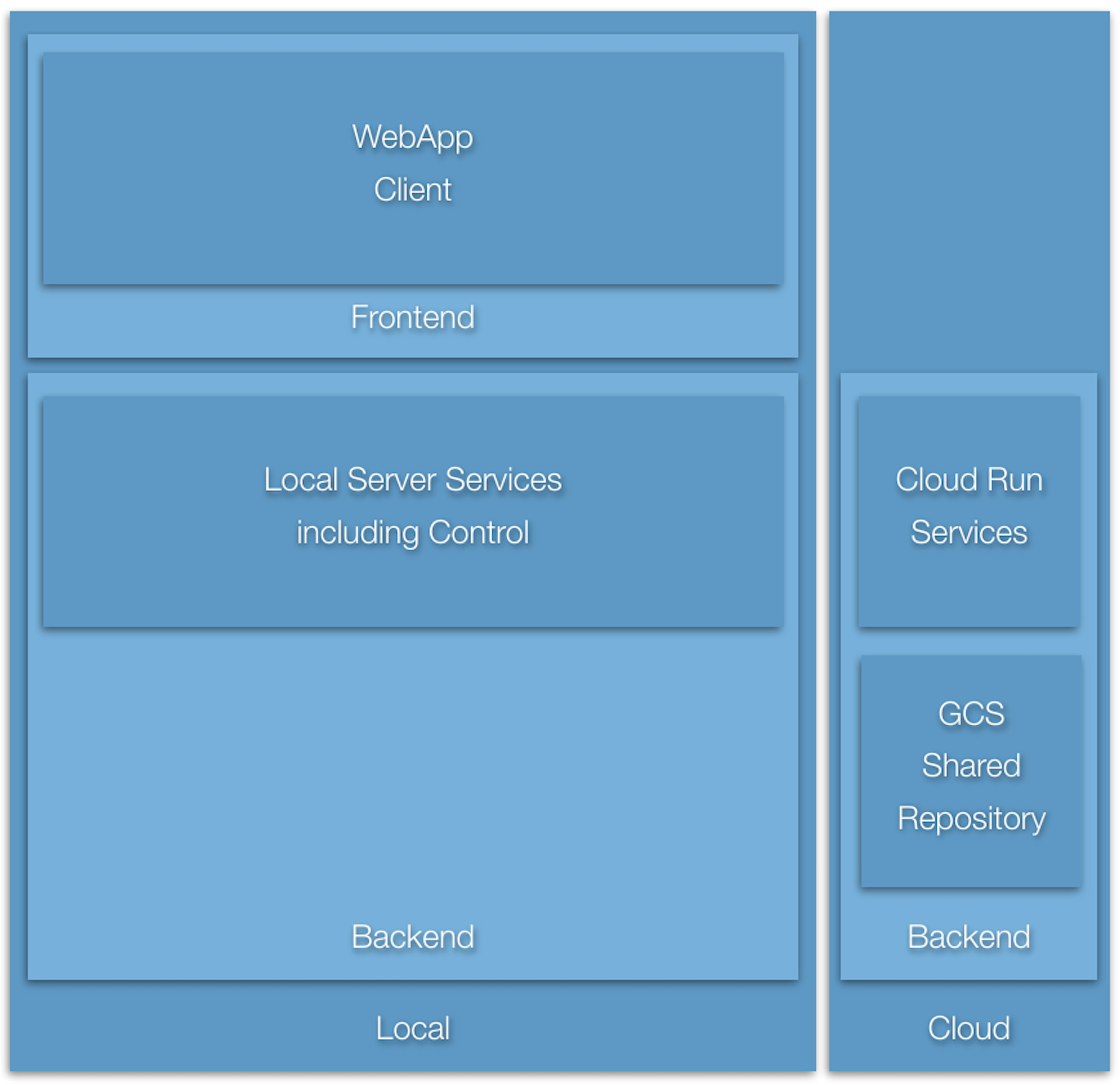
All frontend configurations are supported: bound with the local browser based user interface, as a local standalone application, running in a local Docker container, or running in a CloudRun container. All backend configurations are supported with the first three, but because of addressing issues, if running in a CloudRun container, the backend services must be in the pure CloudRun configuration.
All Cloud Run Configuration
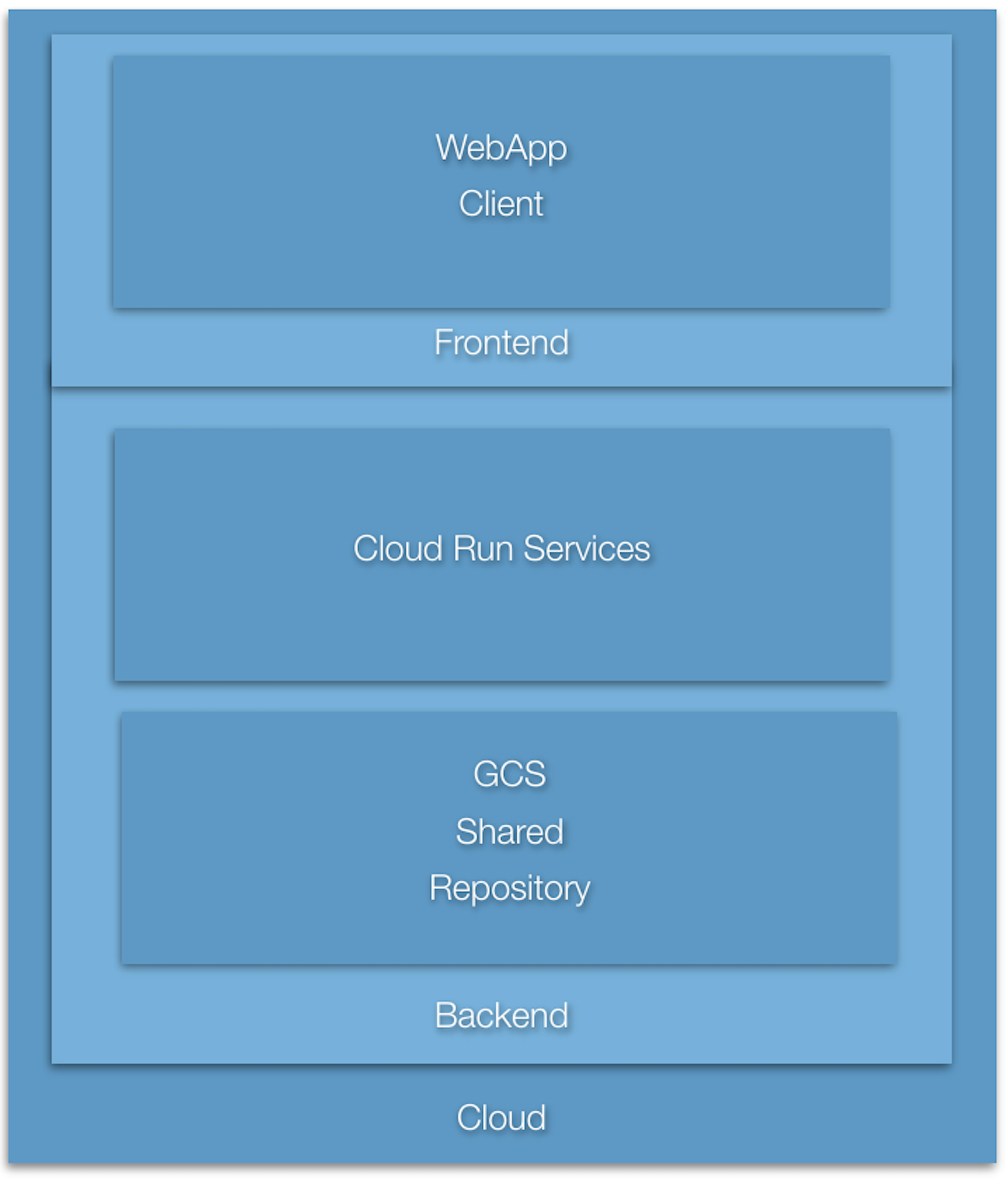
All frontend configurations are supported: bound with the local browser based user interface, as a local standalone application, running in a local Docker container, or running in a CloudRun container. All backend configurations are supported with the first three, but because of addressing issues, if running in a CloudRun container, the backend services must be in the pure CloudRun configuration.
Specifying the Target Microservice Operating Environment
The particular configuration to run is specified by means of assigning a particular Java System property at Java launch time in accordance with the following table. The prefix of each property name is "ai.cloudworks.microservices.network.services.http.WebServer." to which the listed name is appended to result in the full System property name.
| name | value |
|---|---|
| Cloud Run service address | bCloudRun=true |
bServerAppAsCloudRun=true | |
| local Docker container address | bContainer=true |
For example, to specify that all microservices of a target server are running as Cloud Run services, the configuration parameter could be specified as:
java -Dai.cloudworks.microservices.network.services.http.WebServer.bCloudRun=true ...The configuration specifies the specific target service address to be used for each of the microservices. Further configuration examples are forthcoming.
Creating a Cloudworks Web App
A Cloudworks web app is a ReactJava app.
Handling a Remote Service Request
This topic is awaiting a complete walkthrough. Contact Giavaneers for current guidance.
Validating a Service Request
This topic is awaiting a complete walkthrough. Contact Giavaneers for current guidance.
Managing a Service Request Budget
This topic is awaiting a complete walkthrough. Contact Giavaneers for current guidance.
Returning Servlet Status
This topic is awaiting a complete walkthrough. Contact Giavaneers for current guidance.
Configuring the Microservice: the Deployment Descriptor
A microservice is configured by means of a Deployment Descriptor, for example:
public class DeploymentDescriptor
   extends ai.baio.servlets.context.DeploymentDescriptor
{
   protected static final Map<String,String> kCLASSNAME_BY_PATH =
      new HashMap<String,String>()
      {{
         put(IOBConvertServlet.kURL_SERVLET_PATH, OBConvertServlet.class.getName());
      }};
   protected static final Map<String,String> kINIT_PARAMS =
      new HashMap<String,String>()
      {{
         put(IConfiguration.kINIT_PARAM_LOCAL_REPOSITORY, "resources/repository");
         put(IConfiguration.kINIT_PARAM_BUDGET, "2000000;180000000;100000000");
      }};

   @Override
   public Map<String,String> getClassnameByPath()
   {
      return(kCLASSNAME_BY_PATH);
   }

   @Override
   public Map<String,String> getInitParams()
   {
      return(kINIT_PARAMS);
   }
}
For speed and simplicity, the deployment descriptor replaces the normal servlet web.xml file. Its purpose is to specify the servlet class that is to be instantiated for a particular request path, and to optionally assign any servlet configuration parameters.
The getClassnameByPath() method is required and returns a map of servlet classname by request url path.
The getInitParams() method is optional and specifies any standard or custom configuration parameters for the servlet. The following standard configuration parameters are supported:
kINIT_PARAM_CLOUD_STORAGE specifies whether cloud storage is to be used. If omitted, cloud storage is used by default.
kINIT_PARAM_LOCAL_REPOSITORY specifies the absolute or relative path that will act as a local file repository for cached data files. If omitted and cloud storage is not disabled, a file repository will be supplied in the cloud. If omitted and cloud storage is disabled, a local repository at relative path resources/repository will be used.
kINIT_PARAM_BUDGET specifies a service budget. The value string can be defaultInstance which specifies the default budget or an explicit specification of the form:
maxRequests;maxExecuteTime;maxEgressByteswhere:
maxRequestsis the total number of service requests until the end of the current budget periodmaxExecuteTimeis the totalvcpu-millisecondsuntil the end of the current budget periodmaxEgressBytesis the total number of response bytes until the end of the current budget period
If omitted, and cloud service is not disabled, the default budget is used; otherwise, no budget is used.
The default budget is 2 million service requests, 180 million vcpu-milliseconds, and one billion bytes egress until the end of the current billing period.
kINIT_PARAM_BUDGET_PERIOD specifies the length of a budget. The value string can be kINIT_PARAM_BUDGET_PERIOD_DAY or kINIT_PARAM_BUDGET_PERIOD_MONTH. If omitted, kINIT_PARAM_BUDGET_PERIOD_MONTH is used by default.
Shared Repository Hierarchy
A shared repository exists for every operating configuration. If the configuration is all local, the shared repository is the "repository" directory within the project "resources" directory. Local services running as a Shared Server App read and write to the shared repository directly while local Container services read and write to the shared repository by means of a corresponding bind mount.
If the operating configuration is mixed or all Cloud Run, the shared repository is the Google Cloud Storage "baiomicroservicesrepository" bucket of the "BaioMicroservices" cloud project.
Regardless of the location, the shared repository always has the same hierarchy as shown in the figure below:
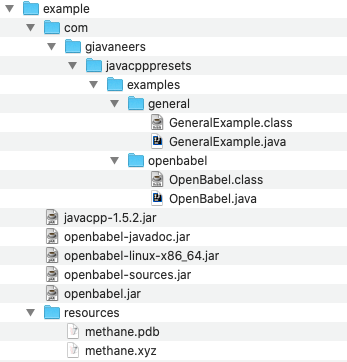
Each job has its own directory within the repository, containing a job file with the same name as the jobId, an optional "scripts" directory which is used to hold any scripts required for the job execution, and a "workProduct" directory used to hold any final results of the job. The job directory also holds one or more context directories which hold all the intermediate work files of each context.
Cost and Performance of Cloud Run Microservices
Measure your own workload in the intended operating configuration. CPU, memory, request volume, network transfer, startup behavior and concurrency all affect cost and latency. Results from a specific experiment are not general performance guarantees.
Consult current Cloud Run pricing and the Google Cloud pricing calculator before deployment. Historical price tables and speculative cost estimates have been removed from this edition.
Building and Debugging a Microservice Locally
This topic is awaiting a complete walkthrough. Contact Giavaneers for current guidance.
Building a Local Microservice Container
This topic is awaiting a complete walkthrough. Contact Giavaneers for current guidance.
Launching a Local Microservice Container
This topic is awaiting a complete walkthrough. Contact Giavaneers for current guidance.
Building a Microservice Cloud Run Container
This topic is awaiting a complete walkthrough. Contact Giavaneers for current guidance.
Tuning a Cloud Run Configuration
Evaluate concurrency, CPU allocation, memory, Java heap size and request timeout against representative traffic. Check the current Cloud Run documentation for supported values and defaults. Confirm the availability and behavior of Cloudworks optimization tools in the version you are using before relying on automation.
Deploying a Microservice Cloud Run Container
This topic is awaiting a complete walkthrough. Contact Giavaneers for current guidance.
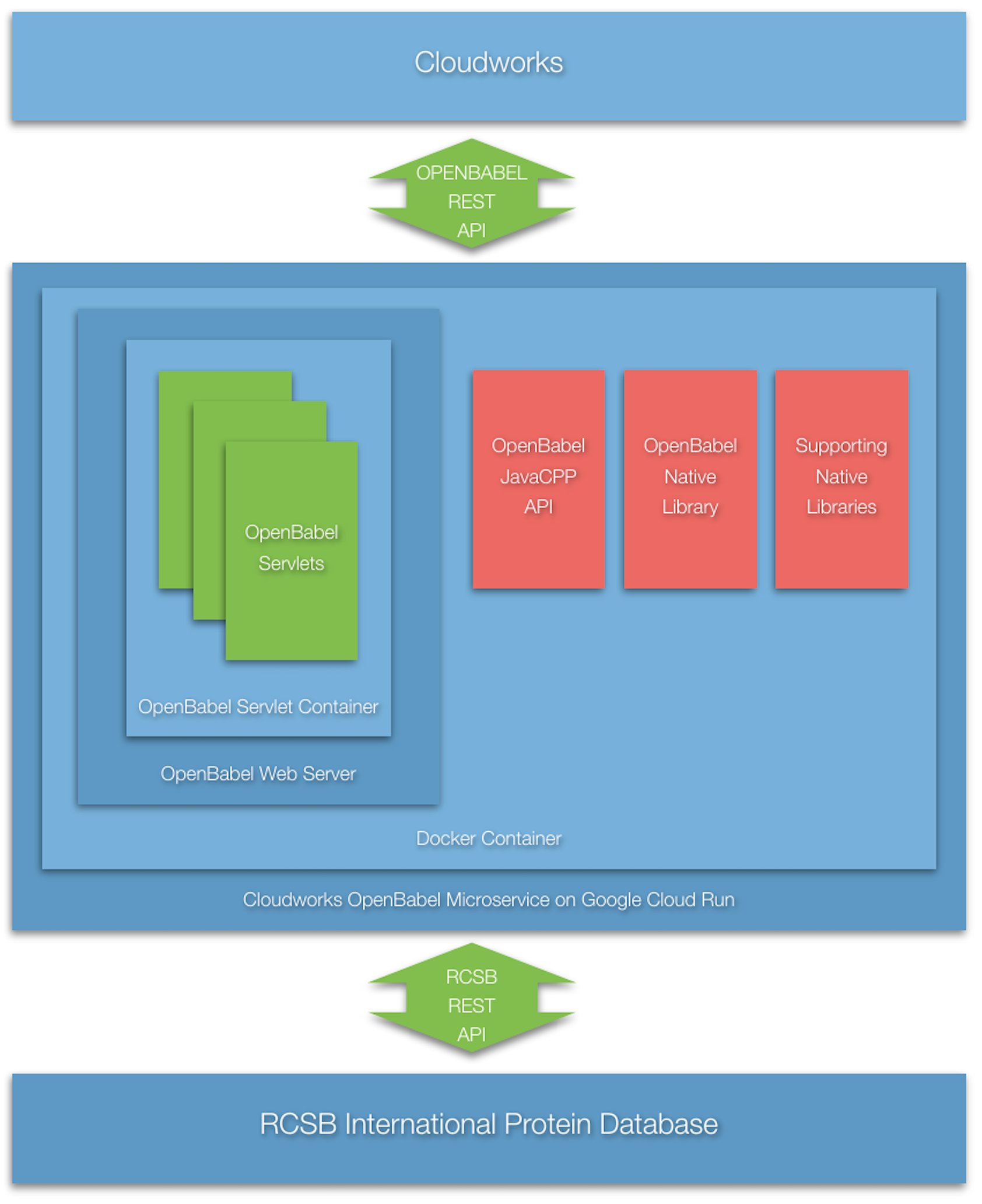
OpenBabel Microservice
Historical integration example. These build files, dependency versions, registry commands and IDE screenshots describe an earlier environment; they are not a verified current installation recipe.
Building a Java API to OpenBabel
JavaCPP is the means by which Java support is provided for OpenBabel. The initial packaging of the JavaCPP Preset for OpenBabel includes a version of the available Java API limited to support for obconversion.h. It is assumed more functionality will be included on a demand basis.
Building the JavaCPP Preset for MacOSX
The initial implementation is for MacOSX, simplifying the development of the Java API. Subsequently, the Preset is built for deployment on a Docker Alpine container (linux-x64). An IntelliJ project called DockerWebApp is used for the development.
Although development was limited to only this initial profile, it nevertheless became necessary to debug the native library implementation. (The symptom was output files from the conversion process were incomplete, containing only one or very few of the expected characters. Through the debugging process, it became clear the file output stream wasn't being flushed, and required invocation of the OBConversion.CloseOutFile() method after return from invocation of the OBConversion.Convert() method.)
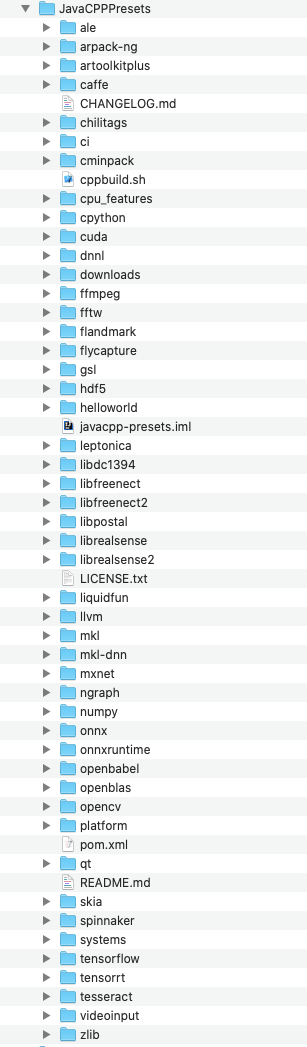
The following figures detail the pertinent sections of the JavaCPPPresets project which can be downloaded from the JavaCPPPresets Git project. The project contains very helpful background information on how to add custom presets, complete with an example for adding a zlib module. The project complete with the addition of the openbabel module is shown below:
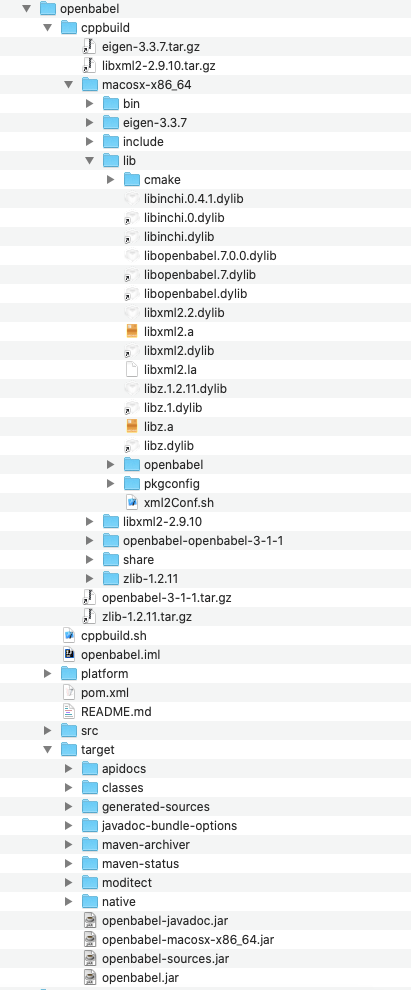
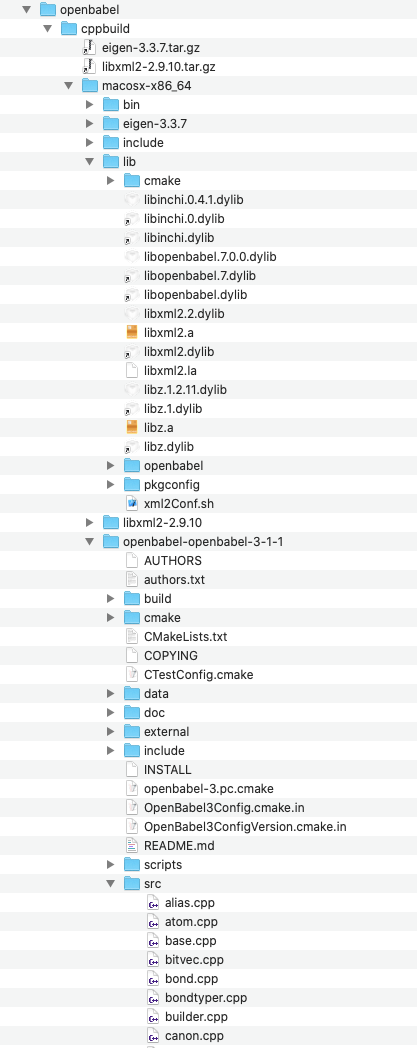
The OpenBabel library source code is contained in the src directory of:
cppbuild/macosx-x86_64/openbabel-openbabel-3-1-1/Debugging is rudimentary, using the insertion of printf statements at strategic locations to provide internal information during execution, in the style of the following generic example:
#include <stdio.h>
...
printf("the string in buffer=%s", buffer);
To cause a rebuild of the target openbabel-macosx-x86_64.jar file, which contains the openbabel dynamic library, delete the three libopenbabel.dylib files as shown above and then double-click the install maven life-cycle target as shown below.
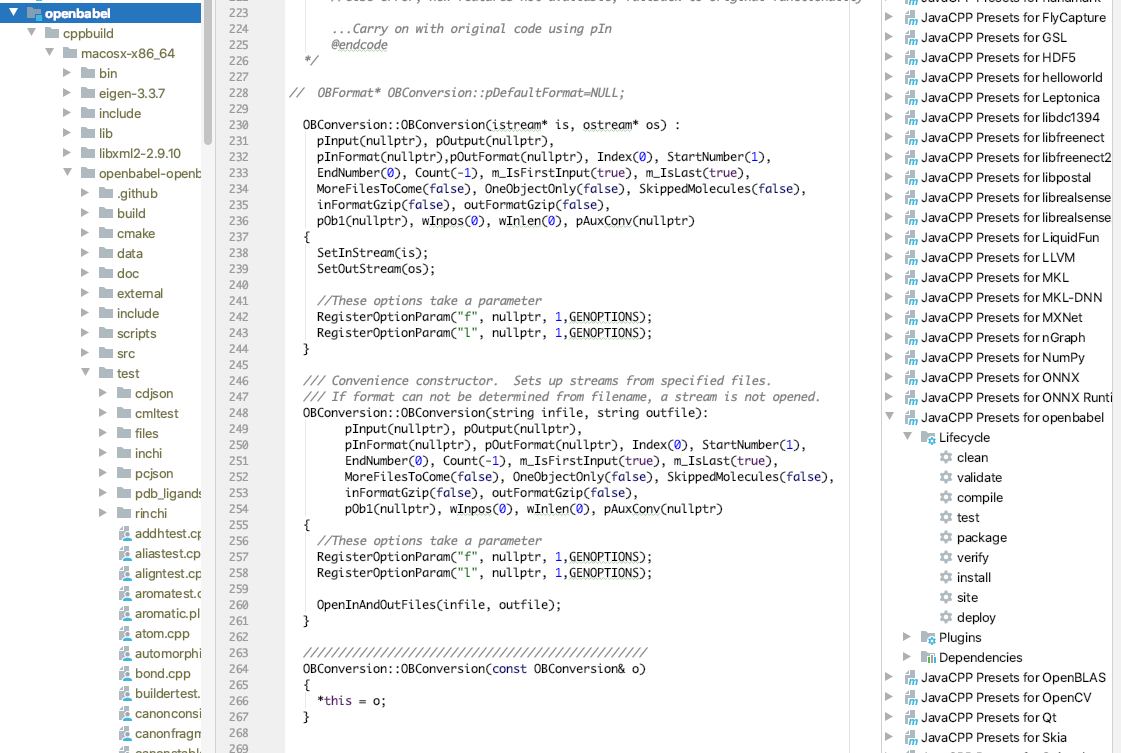
Once built, move the new openbabel-macosx-x86_64.jar file to the lib directory of the JavaCPPPresetsExamples project and run the example under development. Any inserted diagnostics will be written to the project console.
JavaCPP Presets Build Notes
The following are notes generated in the process of building the Presets.
- The first step was to try the
zlibexample.
Directions at <https://github.com/bytedeco/javacpp-presets/wiki/Create-New-Presets>
In section <https://github.com/bytedeco/javacpp-presets/wiki/Create-New-Presets#the-cppbuildsh-file>, invoke bash cppbuild.sh install zlib from within the new zlib folder.
In section <https://github.com/bytedeco/javacpp-presets/wiki/Create-New-Presets#the-java-configuration-files>, for the zlib example, two java configuration files are required: the example given goes in zlib/src/main/java/org/bytedeco/zlib/presets, and the second, called module-info.java, goes in zlib/src/main/java9. The second one, borrowing from another project, contains:
module org.bytedeco.zlib {
  requires transitive org.bytedeco.javacpp;
  exports org.bytedeco.zlib.global;
  exports org.bytedeco.zlib.presets;
  exports org.bytedeco.zlib;
}
In section <https://github.com/bytedeco/javacpp-presets/wiki/Create-New-Presets#the-platformpomxml-files>, make sure the version number, in this case 1.2.11-${project.parent.version}, is the same in all the various pom.xml files.
Try to build the project by calling:
cd javacpp-presets
mvn clean install --projects .,zlib
mvn clean install -f platform --projects ../zlib/platform -Djavacpp.platform.host
This all worked.
- The second step was to build an IntelliJ project to test out the
zlibexample. Refer to theJavaCPPPresetsZlibExampleproject. - The third step was to try to do the same for
openbabel. - For
openbabel, the following changes had to be made: a.parsmart.hhas some bad characters in two header lines (43 and 44) which had to be removed. b.kekulize.hhas some bad characters which had to be removed. c.3. bitvec.hhas some bad characters which had to be removed.
Testing the JavaCPP Presets
The intention is to provide a cloud-based service providing OpenBabel functionality, initially for translating between different molecular file types.
bash-4.4# cd /var/shared/JavaCPPPresets/
bash-4.4# mvn clean install --projects .,openbabel

bash-4.4# cd /var/shared/example
bash-4.4# javac -cp javacpp-1.5.2.jar:openbabel.jar:openbabel-linux-x86_64.jar
com/giavaneers/javacpppresets/examples/general/GeneralExample.java com/giavaneers/
javacpppresets/examples/openbabel/OpenBabel.java

bash-4.4# java -cp javacpp-1.5.2.jar:openbabel.jar:openbabel-linux-x86_64.jar:./
com.giavaneers.javacpppresets.examples.openbabel.OpenBabel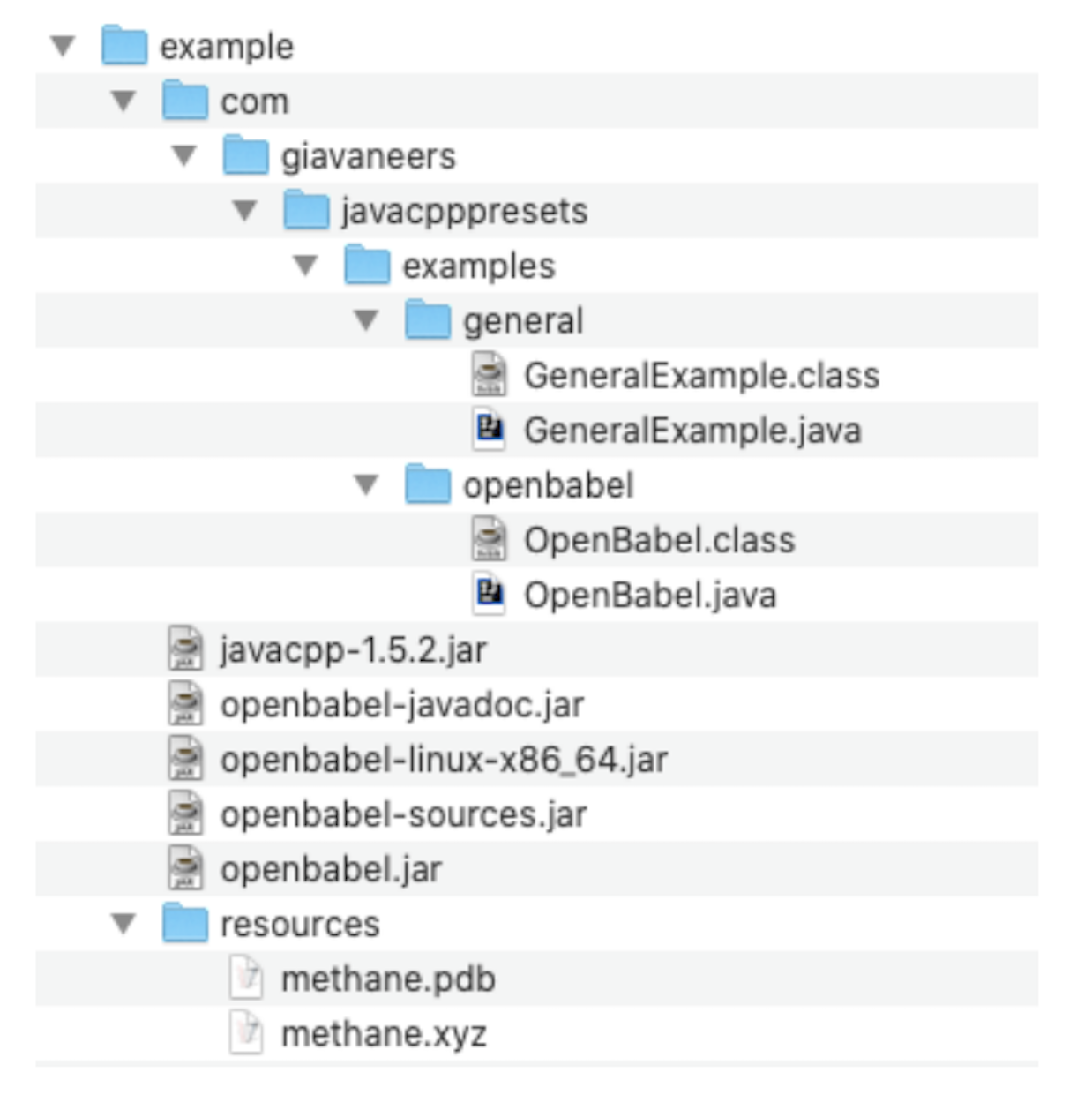
Building the OpenBabel Web Server
Cloud Run works by spinning up a new Docker image to support each network service request it receives. Cost is measured to the 100ms interval, and response time includes the time required to spin up the image and then satisfy the request. According to some Google documentation, "the size of a container image does not affect cold start or request processing time and does not count towards the available memory of the container". According to other Google documentation, "by optimizing the container image, you can reduce load and startup times". In any case, a minimal size container is preferred, since "large container images likely increase security vulnerabilities because they contain more than what the code needs". The time an image takes to respond to a request once executing is dependent on the service software itself.
The Cloudworks Microservice exports a REST API, implemented by a collection of Java Servlets. The typical Docker image for servlets includes Apache with Tomcat, which is relatively large and slow to start up. To minimize image size and to substantially reduce startup time, a custom Web Server, Servlet Container, and set of Servlet base classes was implemented.
The same DockerWebApp IntelliJ project is used for the development of the Cloudworks Web Server. To configure the project for Web Server development, copy the resources/srcBaioWebServer directory to the project root and rename it to src. The WebServer Run/Debug configuration is used.
For speed, the custom Servlet Container does not depend upon a standard web.xml file for configuration and URL mapping, but instead an implementation of the IServletDeploymentDescriptor interface, in this case the DeploymentDescriptor class.
The Cloudworks Web Server is very fast and the Docker image is very small. Response time is a few milliseconds and the total image size is less than 100 MBytes. At the time of this writing, it apparently takes about a second to spin up the image.
Project layout: keep the servlet sources, deployment descriptor, Dockerfile and build configuration together. The legacy source-header screenshot is omitted from this public edition.
Building the OpenBabel Microservice Container
Once the initial MacOSX Preset was completed, and the Cloudworks Web Server debugged, a version of the integrated Webservice for Alpine running in a Docker Container is created.
The image is created by launching the OpenBabelWebService Run/Debug configuration which:
- moves the appropriate source files to the resources maven source directory.
- moves the appropriate
pom.xmlfile from the resources directory to the project root. - moves the appropriate docker file from the resources directory to the project root and executes it.
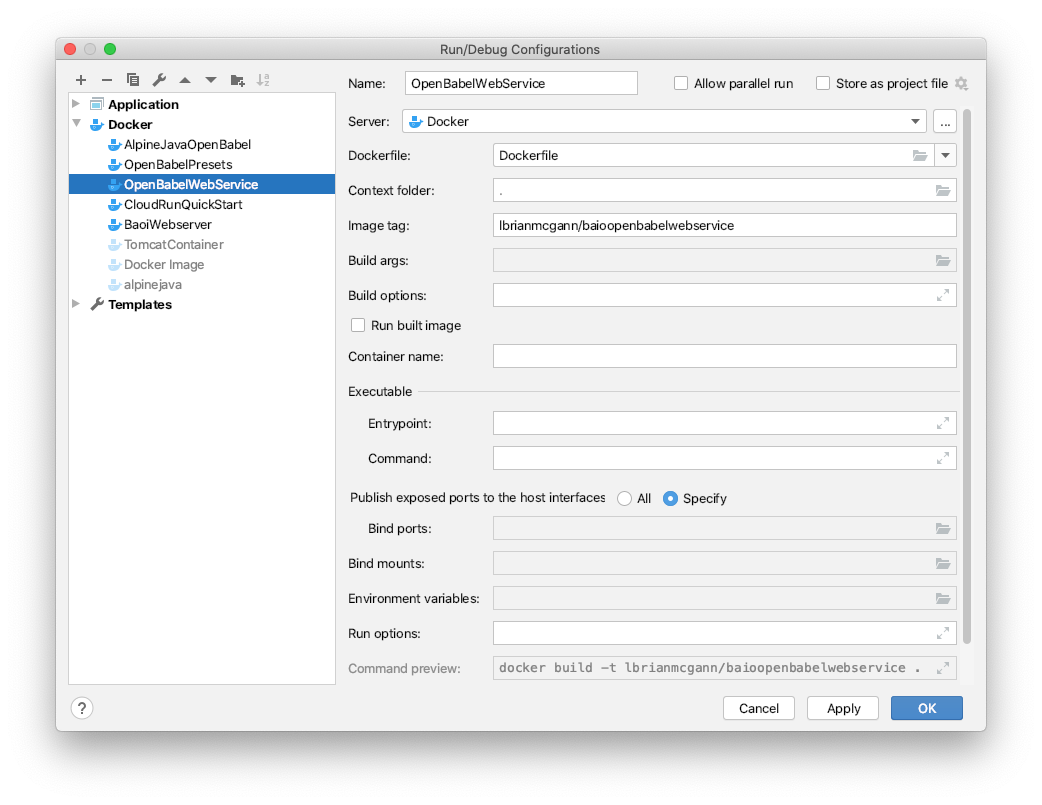
A three stage Docker file is used to (1) build the OpenBable JavaCPP Preset for Alpine, (2) to build the Cloudworks Web Server for Alpine, and (3) to build the integrated production Cloudworks Webservice for Alpine.
# the first section builds the openbabel javacpp-preset ========================
FROM openjdk:8 AS builderPresets
LABEL maintainer="L. Brian McGann<brianm@giavaneers.com>"
RUN apt-get -y update
RUN apt-get -y upgrade
RUN apt-get -y install build-essential
RUN apt-get -y install cmake
#need python-dev for building libxml2
RUN apt-get -y install python2.7-dev
## define a constant with the version of maven to be installed
ARG MAVEN_VERSION=3.6.3
## define a constant with the working directory
ARG USER_HOME_DIR="/root"
## define the maven download URL
ARG BASE_URL=https://apache.osuosl.org/maven/maven-3/${MAVEN_VERSION}/binaries
## create the directories, download maven, validate the download, install it,
## remove downloaded file and set links
RUN mkdir -p /usr/share/maven /usr/share/maven/ref \
  && echo "Downloading maven" \
  && curl -fsSL -o /tmp/apache-maven.tar.gz ${BASE_URL}/apache-maven-$
{MAVEN_VERSION}-bin.tar.gz \
  \
  && echo "Unziping maven" \
  && tar -xzf /tmp/apache-maven.tar.gz -C /usr/share/maven --strip-components=1 \
  \
  && echo "Cleaning and setting links" \
  && rm -f /tmp/apache-maven.tar.gz \
  && ln -s /usr/share/maven/bin/mvn /usr/bin/mvn
WORKDIR /opt
RUN curl -L -O https://storage.googleapis.com/media.iwonderbundle.com/javacpp-
presets/openbabel/JavaCPPPresets.tar.gz
RUN tar xvfz JavaCPPPresets.tar.gz
WORKDIR /opt/JavaCPPPresets
RUN mvn clean install --projects .,openbabel
# the second section builds the baio webserver =================================
# Use the official maven/Java 8 image to create a build artifact.
# https://hub.docker.com/_/maven
FROM maven:3.5-jdk-8-alpine as builderBaioWebserver
# copy the local maven repository
COPY --from=builderPresets /root/.m2/repository/ai/ /root/.m2/repository/ai/
# copy local code to the container image.
WORKDIR /app
COPY pom.xml .
COPY src ./src
# Build a release artifact.
RUN mvn package -DskipTests# the last section used the previous two to build the baio web service =========
FROM adoptopenjdk/openjdk8:jdk8u202-b08-alpine-slim
ENV LD_LIBRARY_PATH /usr/local/lib:$LD_LIBRARY_PATH
ENV BABEL_LIBDIR /usr/local/lib/openbabel/
COPY --from=builderPresets /opt/JavaCPPPresets/openbabel/cppbuild/linux-x86_64/lib/libinchi.so.0.4.1 /usr/local/lib/
COPY --from=builderPresets /opt/JavaCPPPresets/openbabel/cppbuild/linux-x86_64/lib/libopenbabel.so.7.0.0 /usr/local/lib/
COPY --from=builderPresets /opt/JavaCPPPresets/openbabel/cppbuild/linux-x86_64/lib/libxml2.so.2.9.10 /usr/local/lib/
COPY --from=builderPresets /opt/JavaCPPPresets/openbabel/cppbuild/linux-x86_64/lib/libz.so.1.2.11 /usr/local/lib/
WORKDIR /usr/local/lib
RUN ln -s libinchi.so.0.4.1 libinchi.so.0
RUN ln -s libinchi.so.0 libinch.so
RUN ln -s libopenbabel.so.7.0.0 libopenbabel.so.7
RUN ln -s libopenbabel.so.7 libopenbabel.so
RUN ln -s libxml2.so.2.9.10 libxml2.so.2
RUN ln -s libxml2.so.2.9.10 libxml2.so
RUN ln -s libz.so.1.2.11 libz.so.1
RUN ln -s libz.so.1.2.11 libz.so
COPY --from=builderPresets /opt/JavaCPPPresets/openbabel/cppbuild/linux-x86_64/lib/openbabel/3.1.0/ /usr/local/lib/openbabel
ENV BABEL_DATADIR /usr/local/share/openbabel/
COPY --from=builderPresets /opt/JavaCPPPresets/openbabel/cppbuild/linux-x86_64/openbabel-openbabel-3-1-1/data /usr/local/share/openbabel
COPY --from=builderPresets /opt/JavaCPPPresets/openbabel/cppbuild/linux-x86_64/bin/obabel /usr/local/bin/
COPY --from=builderPresets /opt/JavaCPPPresets/openbabel/target/*.jar /webapp/web/WEB-INF/lib/
COPY --from=builderBaioWebserver /app/target/baioopenbabelwebservice-0.1.0-jar-with-dependencies.jar /webapp/baiowebservice-0.1.0.jar
WORKDIR /
# Run the web service on container startup, specifying the
# (0) deplyment descriptor classname and (2) the servletworking directory
CMD ["java", "-Djava.security.egd=file:/dev/./urandom", "-jar", "/webapp/
baiowebservice-0.1.0.jar", "ai.baio.servlets.DeploymentDescriptor", "/webapp"]The pom.xml file used in the second stage is as follows:
<project xmlns="http://maven.apache.org/POM/4.0.0"
         xmlns:xsi="http://www.w3.org/2001/XMLSchema-instance"
         xsi:schemaLocation="http://maven.apache.org/POM/4.0.0
                      http://maven.apache.org/xsd/maven-4.0.0.xsd">
   <modelVersion>4.0.0</modelVersion>
   <groupId>ai.baio</groupId>
   <artifactId>baioopenbabelwebservice</artifactId>
   <version>0.1.0</version>
   <packaging>jar</packaging>
   <dependencies>
      <dependency>
         <groupId>javax.servlet</groupId>
         <artifactId>javax.servlet-api</artifactId>
         <version>3.1.0</version>
      </dependency>
      <dependency>
         <groupId>org.bytedeco</groupId>
         <artifactId>javacpp</artifactId>
         <version>1.5.2</version>
      </dependency>
      <dependency>
         <groupId>ai.baio</groupId>
         <artifactId>openbabel</artifactId>
         <version>1.0.0</version>
      </dependency>
      <dependency>
         <groupId>ai.baio</groupId>
         <artifactId>openbabel-linux-x86_64</artifactId>
         <version>1.0.0</version>
      </dependency>
   </dependencies>
   <build>
      <plugins>
         <plugin>
            <groupId>org.apache.maven.plugins</groupId>
            <artifactId>maven-compiler-plugin</artifactId>
            <version>3.8.1</version>
            <configuration>
               <source>1.8</source>
               <target>1.8</target>
            </configuration>
         </plugin>
         <plugin>
            <groupId>org.apache.maven.plugins</groupId>
            <artifactId>maven-assembly-plugin</artifactId>
            <executions>
               <execution>
                  <phase>package</phase>
                  <goals>
                     <goal>single</goal>
                  </goals>
                  <configuration>
                     <archive>
                        <manifest>
                           <mainClass>
                              ai.baio.network.services.http.WebServer
                           </mainClass>
                        </manifest>
                     </archive>
                     <descriptorRefs>
                        <descriptorRef>jar-with-dependencies</descriptorRef>
                     </descriptorRefs>
                  </configuration>
               </execution>
            </executions>
         </plugin>
      </plugins>
   </build>
</project>
Testing the Webservice Locally
To create a container for the image named lbrianmcgann/helloworld containing an autostarting webapp with a volume mapped to the project local directory named shared and local port 8080 mapped to port 8080 of the image:
> docker run -it \
  -v $(pwd)/shared:/var/shared \
  -p 8080:8080 \
  lbrianmcgann/helloworld
after which the helloworld webapp will be accessible by the url http://localhost:8080.
To create a container for the image named lbrianmcgann/openbabel with a volume mapped to the project local directory named shared and run it with an interactive bash shell:
> docker run -it -v $(pwd)/shared:/var/shared lbrianmcgann/openbabel /bin/bashTo verify the openbabel installation, place a pdb file named methane.pdb in the shared directory and then invoke obabel to convert it to XYZ format:
# obabel /var/shared/methane.pdb -O/var/shared/methane.xyzA new file named methane.xyz should have been created in the shared directory.
To create a container for the image named lbrianmcgann/baioopenbabelwebservice containing an autostarting webservice with a volume mapped to the project local directory named shared and local port 8080 mapped to port 8080 of the image:
> docker run -it \
  -v $(pwd)/shared:/var/shared \
  -p 8080:8080 \
  lbrianmcgann/baioopenbabelwebservice
after which the webservice will be accessible by the url http://localhost:8080/GetColor to get a random color or http://localhost:8080/OBConvert to do an Open Babel file conversion.
For example, to get a bytestream in xyz format for the international protein database file for ProteinID 7BZ5:
http://localhost:8080/OBConvert?data=7BZ5.xyzBuilding the Microservice for Cloud Run
In order to deploy a container image for Google Cloud Run, the image must first be built with a Google Cloud Run compatible tag of the form:
gcr.io/PROJECT-ID/IMAGE-NAMEIn this case, we use:
gcr.io/baiowebservice/webserviceand create an IntelliJ Run/Debug configuration called CloudRunOpenBabelWebService.
Exercising the Image Locally
Once the tagged image is created, it should be exercised locally to ensure proper functionality.
Uploading the Image to the Google Container Registry
The tagged image needs to be uploaded to the Google Container registry:
> docker push gcr.io/baiowebservice/openbabelafter which you can view the image in the registry here.
Creating the Cloud Run Service
The Cloud Run service can now be created by pressing the Create Service menu item at the top of the project Cloud Run page in the Google Developer Console.
For the Service Settings, select Fully Managed in us-west1 (Oregon) region, and choose access controls appropriate to your application; do not enable public invocation unless it is intended. Choose a Service Name, such as baiowebserviceopenbabel.
For Configuring the service's first revision, select the container image from the Container Registry that was just uploaded.
Then Create the Service which takes a few seconds. After created, check out the Logs tab to see if everything started up without error.
Notice the service URL, which should be used for access remotely (for example, https://webservice-mna5yn6qga-uw.a.run.app/).
Updating the Cloud Run Service
Deploy an updated image as a new revision of the existing service, validate it, and then move traffic to it. Keep a known-good revision available for rollback; deleting the service is not a routine update step.
See Google's deployment guide and rollout and rollback guidance.
PyMesh Microservice
Historical integration example. These build files, dependency versions, registry commands and IDE screenshots describe an earlier environment; they are not a verified current installation recipe.
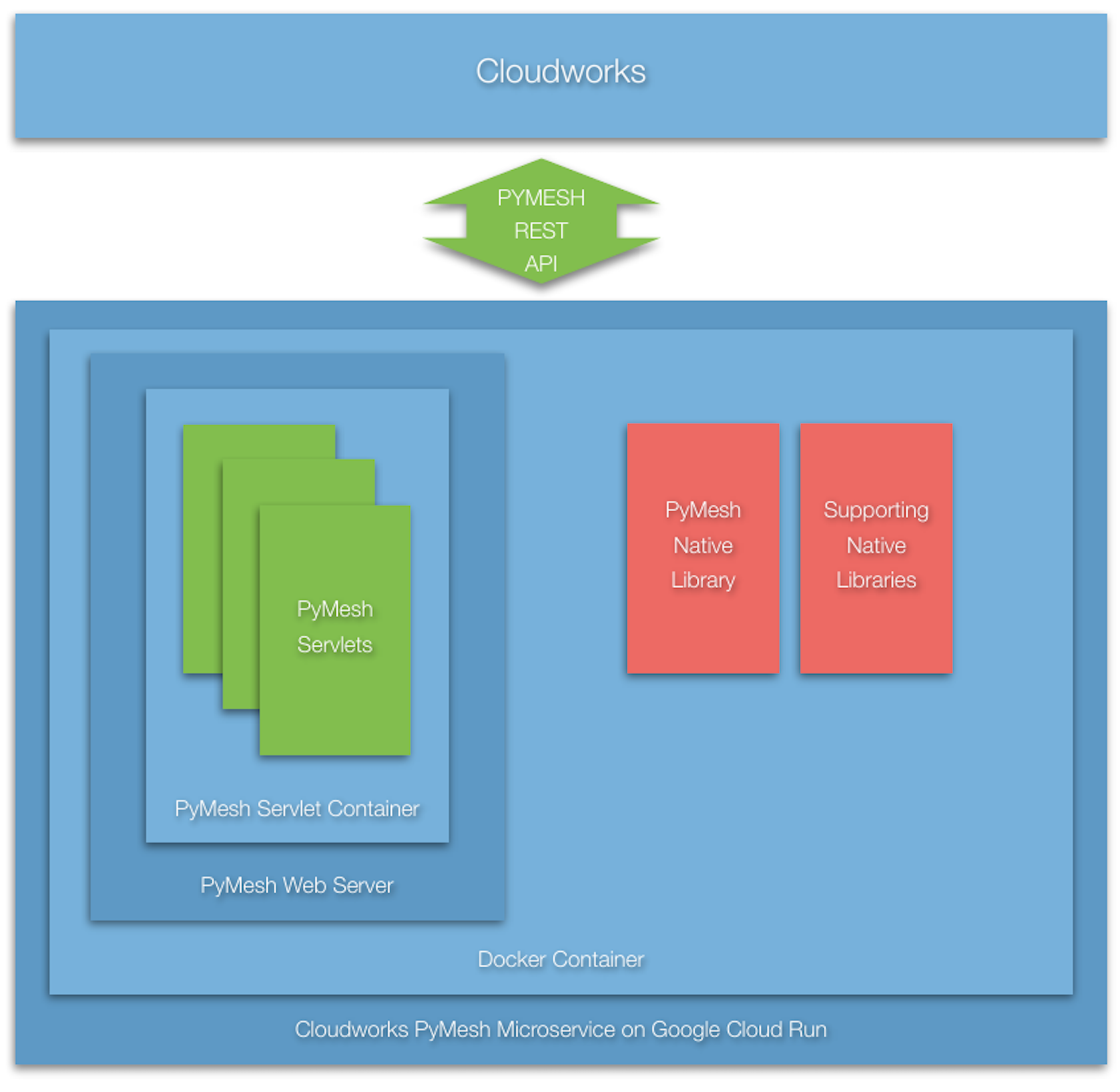
Building a Java API to PyMesh
JavaCPP is the means by which Java support is provided for OpenBabel. The initial packaging of the JavaCPP Preset for OpenBabel includes a version of the available Java API limited to support for obconversion.h. It is assumed more functionality will be included on a demand basis.
Building the PyMesh Web Server
Cloud Run works by spinning up a new Docker image to support each network service request it receives. Cost is measured to the 100ms interval, and response time includes the time required to spin up the image and then satisfy the request. The time it takes to spin up an image is largely a function of its size. The time an image takes to repond to a request once executing is dependent on the service software.
The Cloudworks Microservice exports a REST API, implemented by a collection of Java Servlets. The typical Docker image for servlets includes Apache with Tomcat, which is relatively large and slow to start up. To minimize image size and to substantially reduce startup time, a custom Web Server, Servlet Container, and set of Servlet base classes was implemented.
The same 'DockerWebApp' IntelliJ project is used for the development of the Cloudworks Web Server. To configure the project for Web Server development, copy the resources/ srcBaioWebServer dirctory to the project root and rename it to 'src'. The 'WebServer' Run/Debug configuration is used.
For speed, the custom Servlet Container does not depend upon a standard 'web.xml' file for configuration and URL mapping, but instead an implementation of the 'IServletDeploymentDescriptor' interface, in this case the 'DeploymentDescriptor' class.
The Cloudworks Web Server is very fast and the Docker image is very small. Response time is a few milliseconds and the total image size is less than 100 MBytes. At the time of this writing, it is not known what time it takes to spin up the image.
Project layout: keep the servlet sources, deployment descriptor, Dockerfile and build configuration together. The legacy source-header screenshot is omitted from this public edition.
Building the PyMesh Microservice Container
Once the PyMesh Web Server was debugged, a version of the integrated Webservice for Alpine running in a Docker Container was implemented.
The image is created by means of the 'PyMesh WebService' Run/Debug configuration after having moved the resources/srcMavenBaioWebServer directory to the project root and renaming it to 'src':
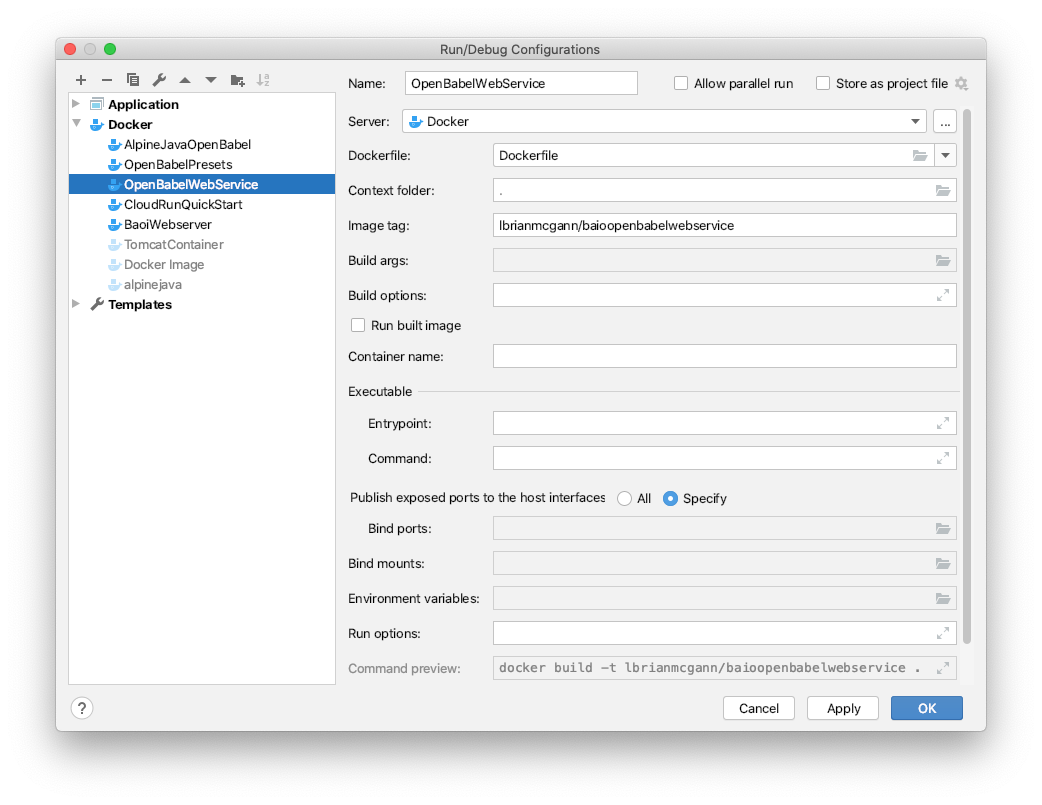
A two stage Docker file is used (1) to build the PyMesh Web Server for Alpine, and (2) to build the integrated production PyMesh Webservice for Alpine.
# the first section builds the pymesh webserver ================================
# Use the official maven/Java 8 image to create a build artifact.
# https://hub.docker.com/_/maven
FROM maven:3.5-jdk-8-alpine as builderBaioWebserver
# copy the local maven repository
COPY --from=builderPresets /root/.m2/repository/ai/ /root/.m2/repository/ai/
# copy local code to the container image.
WORKDIR /app
COPY pom.xml .
COPY src ./src
# Build a release artifact.
RUN mvn package -DskipTests
# the last section uses the previous build the pymesh web service ==============
# Use AdoptOpenJDK for base image.
# It's important to use OpenJDK 8u191 or above that has container support enabled.
# https://hub.docker.com/r/adoptopenjdk/openjdk8
# https://docs.docker.com/develop/develop-images/multistage-build/#use-multi-stage-
builds
FROM adoptopenjdk/openjdk8:jdk8u202-b08-alpine-slim
# add the elements of the javacpp-preset image =================================
# assign and export the library path environment variable
ENV LD_LIBRARY_PATH /usr/local/lib:$LD_LIBRARY_PATH
# assign openbabel library path environment variable
ENV BABEL_LIBDIR /usr/local/lib/openbabel/
# copy the built preset libraries to /usr/local/lib and create symlinks ========
COPY --from=builderPresets /opt/JavaCPPPresets/openbabel/cppbuild/linux-x86_64/lib/
libinchi.so.0.4.1 /usr/local/lib/
COPY --from=builderPresets /opt/JavaCPPPresets/openbabel/cppbuild/linux-x86_64/lib/
libopenbabel.so.7.0.0 /usr/local/lib/
COPY --from=builderPresets /opt/JavaCPPPresets/openbabel/cppbuild/linux-x86_64/lib/
libxml2.so.2.9.10 /usr/local/lib/
COPY --from=builderPresets /opt/JavaCPPPresets/openbabel/cppbuild/linux-x86_64/lib/
libz.so.1.2.11 /usr/local/lib/
WORKDIR /usr/local/lib
RUN ln -s libinchi.so.0.4.1 libinchi.so.0
RUN ln -s libinchi.so.0 libinch.so
RUN ln -s libopenbabel.so.7.0.0 libopenbabel.so.7
RUN ln -s libopenbabel.so.7 libopenbabel.so
RUN ln -s libxml2.so.2.9.10 libxml2.so.2
RUN ln -s libxml2.so.2.9.10 libxml2.so
RUN ln -s libz.so.1.2.11 libz.so.1
RUN ln -s libz.so.1.2.11 libz.so
# copy the built format libraries to /usr/local/lib/openbabel ===============
COPY --from=builderPresets /opt/JavaCPPPresets/openbabel/cppbuild/linux-x86_64/lib/
openbabel/3.1.0/ /usr/local/lib/openbabel
# assign openbabel data path environment variable
ENV BABEL_DATADIR /usr/local/share/openbabel/
# copy the built data files to /usr/local/share/openbabel ===============
COPY --from=builderPresets /opt/JavaCPPPresets/openbabel/cppbuild/linux-x86_64/
openbabel-openbabel-3-1-1/data /usr/local/share/openbabel
# copy the obabel executable to /usr/local/bin ====================
COPY --from=builderPresets /opt/JavaCPPPresets/openbabel/cppbuild/linux-x86_64/bin/
obabel /usr/local/bin/
# copy the obabel presets to /webapp/web/WEB-INF/lib ====================
COPY --from=builderPresets /opt/JavaCPPPresets/openbabel/target/*.jar /webapp/web/
WEB-INF/lib/
# Copy the jar to the production image from the builder stage.
COPY --from=builderBaioWebserver /app/target/baioopenbabelwebservice-0.1.0-jar-
with-dependencies.jar /webapp/baiowebservice-0.1.0.jar
WORKDIR /
# Run the web service on container startup, specifying the
# (0) deplyment descriptor classname and (2) the servletworking directory
CMD ["java", "-Djava.security.egd=file:/dev/./urandom", "-jar", "/webapp/
baiowebservice-0.1.0.jar", "ai.baio.servlets.DeploymentDescriptor", "/webapp"]The pom.xml file used in the second stage is as follows:
<project xmlns="http://maven.apache.org/POM/4.0.0"
         xmlns:xsi="http://www.w3.org/2001/XMLSchema-instance"
         xsi:schemaLocation="http://maven.apache.org/POM/4.0.0
                      http://maven.apache.org/xsd/maven-4.0.0.xsd">
   <modelVersion>4.0.0</modelVersion>
   <groupId>ai.baio</groupId>
   <artifactId>baioopenbabelwebservice</artifactId>
   <version>0.1.0</version>
   <packaging>jar</packaging>
   <dependencies>
      <dependency>
         <groupId>javax.servlet</groupId>
         <artifactId>javax.servlet-api</artifactId>
         <version>3.1.0</version>
      </dependency>
      <dependency>
         <groupId>org.bytedeco</groupId>
         <artifactId>javacpp</artifactId>
         <version>1.5.2</version>
      </dependency>
      <dependency>
         <groupId>ai.baio</groupId>
         <artifactId>openbabel</artifactId>
         <version>1.0.0</version>
      </dependency>
      <dependency>
         <groupId>ai.baio</groupId>
         <artifactId>openbabel-linux-x86_64</artifactId>
         <version>1.0.0</version>
      </dependency>
   </dependencies>
   <build>
      <plugins>
         <plugin>
            <groupId>org.apache.maven.plugins</groupId>
            <artifactId>maven-compiler-plugin</artifactId>
            <version>3.8.1</version>
            <configuration>
               <source>1.8</source>
               <target>1.8</target>
            </configuration>
         </plugin>
         <plugin>
            <groupId>org.apache.maven.plugins</groupId>
            <artifactId>maven-assembly-plugin</artifactId>
            <executions>
               <execution>
                  <phase>package</phase>
                  <goals>
                     <goal>single</goal>
                  </goals>
                  <configuration>
                     <archive>
                        <manifest>
                           <mainClass>
                              ai.baio.network.services.http.WebServer
                           </mainClass>
                        </manifest>
                     </archive>
                     <descriptorRefs>
                        <descriptorRef>jar-with-dependencies</descriptorRef>
                     </descriptorRefs>
                  </configuration>
               </execution>
            </executions>
         </plugin>
      </plugins>
   </build>
</project>
Testing the Webservice Locally
To create a container for the image named 'lbrianmcgann/helloworld' containing an autostarting webapp with a volume mapped to the project local directory named 'shared' and local port 8080 mapped to port 8080 of the image,
> docker run -it \
  -v $(pwd)/shared:/var/shared \
  -p 8080:8080 \
  lbrianmcgann/openbabel
after which the helloworld webapp will be accessible by the url http://localhost:8080.
To create a container for the image named 'lbrianmcgann/openbabel' with a volume mapped to the project local directory named 'shared' and run it with an interactive bash shell,
> docker run -it -v $(pwd)/shared:/var/shared lbrianmcgann/openbabel /bin/bashTo verify the openbabel installation, place a pdb file named 'methane.pdb' in the 'shared' directory and then invoke obabel to convert it to XYZ format,
# obabel /var/shared/methane.pdb -O/var/shared/methane.xyzA new file named 'methane.xyz' should have been created in the 'shared' directory.
To create a container for the image named 'lbrianmcgann/baioopenbabelwebservice' containing an autostarting webservice with a volume mapped to the project local directory named 'shared' and local port 8080 mapped to port 8080 of the image,
> docker run -it \
  -v $(pwd)/shared:/var/shared \
  -p 8080:8080 \
  lbrianmcgann/baioopenbabelwebservice
after which the webservice will be accessible by the url http://localhost:8080/GetColor to get a random color or http://localhost:8080/OBConvert to do an Open Babel file conversion.
For example, to get a bytestream in xyz format for the international protein database file for ProteinID 7BZ5,
http://localhost:8080/OBConvert?data=7BZ5.xyzBuilding the Microservice for Cloud Run
In order to deploy a container image for Google Cloud Run, the image must first be built with a Google Cloud Run compatible tag of the form:
gcr.io/PROJECT-ID/IMAGE-NAMEIn this case, we use:
gcr.io/baiowebservice/webserviceand create an IntelliJ Run/Debug configuration called CloudRunOpenBabelWebService:
Exercising the Image Locally
Once the tagged image is created, it should be exercized locally to ensure proper functionality.
Uploading the Image to the Google Container Registry
The tagged image needs to be uploaded to the Google Container registry:
> docker push gcr.io/baiowebservice/webserviceafter which you can view the image in the registry at http://gcr.io/baiowebservice/webservice.
Creating the Cloud Run Service
The Cloud Run service can now be created by pressing the 'Create Service' menu item at the top of the project Cloud Run page in the Google Developer Console.
For the Service Settings, select 'Fully Managed' in 'us-west1 (Oregon)' region, and choose access controls appropriate to your application; do not enable public invocation unless it is intended.
For Configuring the service's first revision, select the container image from the Container Registry that was just uploaded.
Then 'Create the Service' which takes a few seconds. After created, check out the 'Logs' tab to see if everything started up without error.
Notice the service URL, which should be used for access remotely (for example, https://webservice-mna5yn6qga-uw.a.run.app/).
Updating the Cloud Run Service
Deploy an updated image as a new revision of the existing service, validate it, and then move traffic to it. Keep a known-good revision available for rollback; deleting the service is not a routine update step.
See Google's deployment guide and rollout and rollback guidance.
History
| Date | Change | Author |
|---|---|---|
| 16 Jul, 2020 | Initial draft. | LBM |
| 28 Nov, 2020 | Added description of microservices in addition to OBConvert. | LBM |
| 15 Jan, 2021 | Added description of newer means of building and deploying the microservices. | LBM |
| 19 Apr, 2021 | Added section on Data and DataList. | LBM |
| 09 Nov, 2021 | Added section on Job Registration. | LBM |
| 03 Jan, 2022 | Added section on Microservice Auto-Optimization. | LBM |
| 04 Jan, 2024 | Converted from Baio Microservices User Guide. | LBM |
| 09 Jun, 2026 | Added the Service Interface section, including IService verb examples and an aiConversationOpenEnded() walkthrough. | Giavaneers - Codex |
| 04 Aug, 2026 | Specified fluent, service-level request-admission configuration, including job policy, reusable service requirements, gate lifecycle, nested provider gates, and requestRequires(...) terminology. | Giavaneers - Codex |
| 05 Aug, 2026 | Elevated Job Constraints and moved it before Job Registration; moved Job Registration before Service Interface and normalized the moved sections' heading hierarchy. | Giavaneers - Codex |
| 05 Aug, 2026 | Moved Shared Repository Hierarchy beneath Creating a Cloudworks Web App, immediately after Deployment Descriptor configuration. | Giavaneers - Codex |
| 05 Aug, 2026 | Moved Built-In Services to follow Service Interface directly. | Giavaneers - Codex |
| 05 Aug, 2026 | Folded the Element Hierarchy figure and explanation into Architectural Overview. | Giavaneers - Codex |
| 05 Aug, 2026 | Moved Operating Configurations to follow Built-In Services directly. | Giavaneers - Codex |
| 05 Aug, 2026 | Added Architectural Overview subsections for each Element Hierarchy element. | Giavaneers - Codex |
| 05 Aug, 2026 | Refactored Constraints to distinguish job policy, service request requirements, physical request state, and gate lifecycle. | Giavaneers - Codex |
| 05 Aug, 2026 | Clarified the role of constraints during concurrent operation and introduced the job admission gate before use. | Giavaneers - Codex |
| 05 Aug, 2026 | Clarified the gate's non-blocking, thread-free waiting behavior. | Giavaneers - Codex |
| 05 Aug, 2026 | Defined an admission permit before introducing permit release. | Giavaneers - Codex |
| 07 Aug, 2026 | Added the Calculator built-in service and documented its Cloud Run Mandelbrot parallel-render experiments. | Giavaneers - Codex |